Templates · List and feed screens · Finance app · Storefront
Storefront Customers screen
A list screen from Storefront, a finance app template in an Enterprise style. Screen 16 of 25.
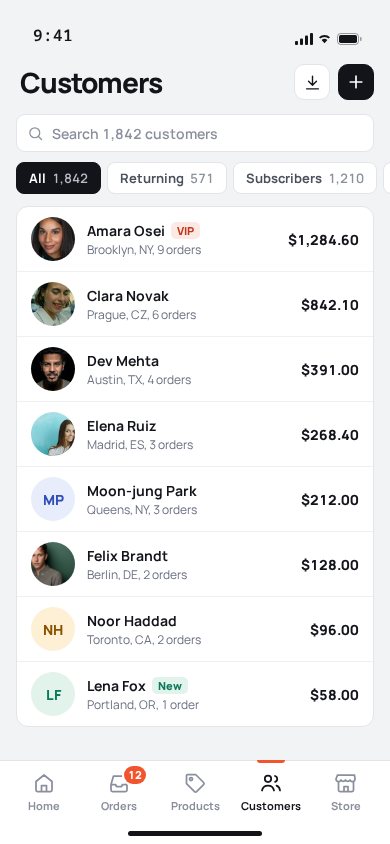
Storefront is a complete merchant app for a small online shop: welcome and sign in with a store picker, a home with today's sales against last week, live visitors and things to do, analytics, a live visitor map, orders with payment and fulfilment tags, an order with fulfil and buy label flows ending in a printable shipping label, search, products, a product page, add product, inventory, customers and a customer profile, discounts and a new code, payouts and a payout breakdown, notifications, plans, the store menu and settings. Cool grey and white with ink and persimmon.
| Detail | Value |
|---|---|
| Screen type | List |
| App | Storefront: Run your online store |
| Category | Finance |
| Design language | Enterprise, light |
| Type | Manrope |
| Colours | #f2f3f5 background, #ffffff surface, #12141a text, #697080 text-muted, #f2542d accent, #ffffff accent-contrast, #0b7a5a secondary, #e3e5ea border, #c2361c danger |
What this screen says
- Customers
- Search 1,842 customers
- All 1,842 Returning 571 Subscribers 1,210 VIP 38
- Amara OseiVIP
- Brooklyn, NY, 9 orders
- Clara Novak
- Prague, CZ, 6 orders
- Dev Mehta
- Austin, TX, 4 orders
- Elena Ruiz
- Madrid, ES, 3 orders
- MP
- Moon-jung Park
- Queens, NY, 3 orders
- Felix Brandt
- Berlin, DE, 2 orders
- NH
- Noor Haddad
- Toronto, CA, 2 orders
- LF
- Lena FoxNew
- Portland, OR, 1 order
- Home
- 12Orders
- Products
- Store
Around it in Storefront
More list and feed screens
- Strike Option chain: Options trading
- Prism Accounts: Net worth across every account
- Folio Watchlist: Stocks and ETF investing
- Compound Fund list: Mutual funds and SIPs
- Halden Transactions: Premium neobank
- Billable Today: Time tracking and invoices, kept like a ledger
- Lease Receipts: Your tenancy, drawn to plan
- Claim Expenses: Expenses, filed like a till receipt
- Tally Notifications: Monthly budgeting
- Divvy Notifications: Split bills with friends
- Ticker Movers: Stock investing
- Burrow Notifications: Shared savings pots
What makes a good list screen
- Show what people need to decide. Each row should carry just enough to choose: a title, one or two details and a status. Everything else belongs on the detail screen.
- Keep rows consistent. The same information in the same place on every row lets people scan down a column instead of reading each item.
- Group with headings. Dates, categories or status headings break long lists into chunks people can skip through.
- Make common actions quick. Swipe actions, a checkbox or a heart on the row save opening the item for small tasks.
The full list screen guide and every example
Remix Storefront free: describe your own app and it is drawn in this design. Or get its files from $10: Figma, React Native, SwiftUI, Flutter and HTML.