Templates · Form and input screens · Finance app · Storefront
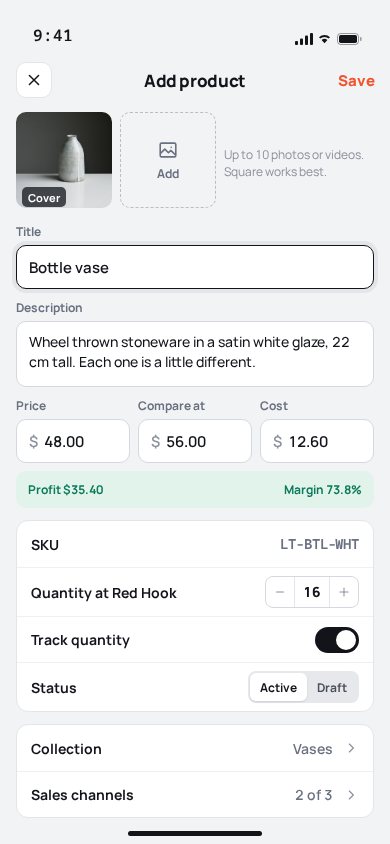
Storefront Add product screen
A form screen from Storefront, a finance app template in an Enterprise style. Screen 14 of 25.
Storefront is a complete merchant app for a small online shop: welcome and sign in with a store picker, a home with today's sales against last week, live visitors and things to do, analytics, a live visitor map, orders with payment and fulfilment tags, an order with fulfil and buy label flows ending in a printable shipping label, search, products, a product page, add product, inventory, customers and a customer profile, discounts and a new code, payouts and a payout breakdown, notifications, plans, the store menu and settings. Cool grey and white with ink and persimmon.
| Detail | Value |
|---|---|
| Screen type | Form |
| App | Storefront: Run your online store |
| Category | Finance |
| Design language | Enterprise, light |
| Type | Manrope |
| Colours | #f2f3f5 background, #ffffff surface, #12141a text, #697080 text-muted, #f2542d accent, #ffffff accent-contrast, #0b7a5a secondary, #e3e5ea border, #c2361c danger |
What this screen says
- Add product
- Save
- Cover
- Add
- Up to 10 photos or videos. Square works best.
- Title
- Bottle vase
- Description
- Wheel thrown stoneware in a satin white glaze, 22 cm tall. Each one is a little different.
- Price
- Compare at
- Cost
- Profit $35.40 Margin 73.8%
- SKU LT-BTL-WHT
- Quantity at Red Hook
- Track quantity
- Status
- ActiveDraft
- Collection Vases
- Sales channels 2 of 3
Around it in Storefront
More form and input screens
- Keel Request card: Corporate cards and spend controls
- Giftly Card design: Gift cards, sent and stored
- Zap Pay: Pay friends with a note
- Billfold Verify card: Cards, passes and tickets wallet
- Payly Amount: UPI payments, recharges and bills
- Crest Add card: Credit card bills and rewards
- Bastion Transfer: Everyday banking from a big bank
- Later Pay early: Buy now, pay in four
- Standing Dispute: Credit score and reports
- Accrue Contributions: Retirement and pension planner
- Levy Log expense: Taxes for freelancers
- Bullion Buy gold: Gold and silver savings
What makes a good form screen
- Ask only what you need. Every field is a reason to stop. Remove optional fields or move them to later.
- Labels above fields. Visible labels stay readable while people type; placeholder-only labels disappear.
- Use the right keyboard and input. Number pads for amounts, email keyboards for email, pickers for dates and autofill for addresses and codes.
- Validate as people go. Show problems next to the field when people leave it, in words that say how to fix them.
The full form screen guide and every example
Remix Storefront free: describe your own app and it is drawn in this design. Or get its files from $10: Figma, React Native, SwiftUI, Flutter and HTML.