Templates · Form and input screens · Finance app · Billfold
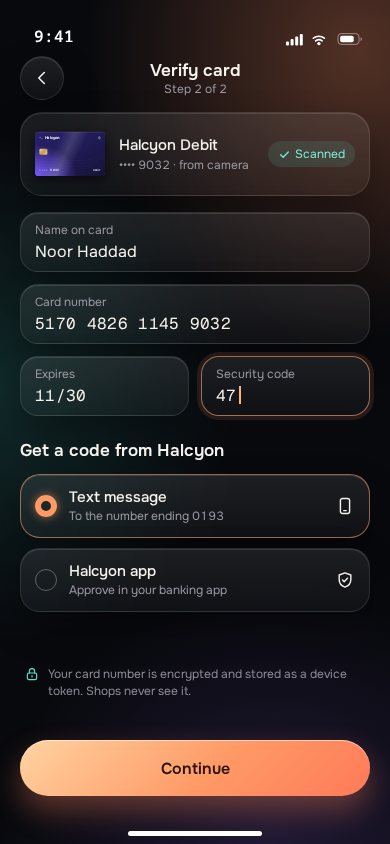
Billfold Verify card screen
A form screen from Billfold, a finance app template in a Glass style. Screen 9 of 25.
Billfold is a complete everyday wallet: welcome, sign in, a wallet home with stacked cards and passes, a card with its balance and latest activity, transactions and a receipt with a map, card details with freeze and limits, scanning and verifying a new card, tap to pay and a paid screen, a passes list, a boarding pass with live flight status, a concert ticket, a coffee stamp card, a transit card with top up, spending insights, search, notifications, a Plus plan, profile and settings. Near black glass with apricot and teal light.
| Detail | Value |
|---|---|
| Screen type | Form |
| App | Billfold: Cards, passes and tickets wallet |
| Category | Finance |
| Design language | Glass, dark |
| Type | Bricolage Grotesque for headings, Onest for text |
| Colours | #08090d background, #16161d surface, #f6f2ec text, #9b98a3 text-muted, #ff9a66 accent, #2b1407 accent-contrast, #5fe3cf secondary, #2a2a33 border, #ff6b6b danger |
What this screen says
- Verify cardStep 2 of 2
- Halcyon
- •••• 9032
- DEBIT
- Halcyon Debit
- •••• 9032 · from camera
- Scanned
- Name on card
- Noor Haddad
- Card number
- Expires
- Security code
- Get a code from Halcyon
- Text message
- To the number ending 0193
- Halcyon app
- Approve in your banking app
- Your card number is encrypted and stored as a device token. Shops never see it.
- Continue
Around it in Billfold
More form and input screens
- Bastion Transfer: Everyday banking from a big bank
- Later Pay early: Buy now, pay in four
- Standing Dispute: Credit score and reports
- Accrue Contributions: Retirement and pension planner
- Levy Log expense: Taxes for freelancers
- Bullion Buy gold: Gold and silver savings
- Wage Cash out: Get paid as you work
- Keystone Make payment: Mortgage and home loan tracker
- Rebate Cash out: Cashback card and rewards
- Aegis New claim: Insurance policies and claims
- Till Charge: Card reader and sales for small shops
- Strike Strategy builder: Options trading
What makes a good form screen
- Ask only what you need. Every field is a reason to stop. Remove optional fields or move them to later.
- Labels above fields. Visible labels stay readable while people type; placeholder-only labels disappear.
- Use the right keyboard and input. Number pads for amounts, email keyboards for email, pickers for dates and autofill for addresses and codes.
- Validate as people go. Show problems next to the field when people leave it, in words that say how to fix them.
The full form screen guide and every example
Remix Billfold free: describe your own app and it is drawn in this design. Or get its files from $10: Figma, React Native, SwiftUI, Flutter and HTML.