Templates · Form and input screens · Lifestyle app · Stitch
Stitch New project screen
A form screen from Stitch, a lifestyle app template in a Playful style. Screen 16 of 25.
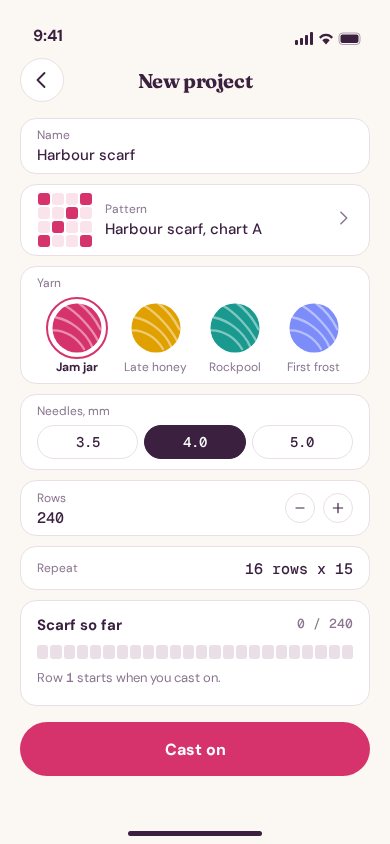
Stitch is stitch keeps a knitter's projects, patterns and yarn in one place. It covers a row counter with repeats, readable charts, a stash with skeins and metres, stitch guides, gauge swatches, stats and a membership.
| Detail | Value |
|---|---|
| Screen type | Form |
| App | Stitch: A knitting companion drawn as one big knitting chart |
| Category | Lifestyle |
| Design language | Playful, light |
| Type | DM Sans |
| Colours | #fbf7f2 background, #ffffff surface, #3b2040 text, #8a7590 text-muted, #d6336c accent, #ffffff accent-contrast, #1a9a8f secondary, #eadfe6 border, #c2264f danger |
What this screen says
- New project
- Name Harbour scarf
- Pattern Harbour scarf, chart A
- Yarn
- Jam jar
- Late honey
- Rockpool
- First frost
- Needles, mm
- Rows 240
- Repeat 16 rows x 15
- Scarf so far0 / 240
- Row 1 starts when you cast on.
- Cast on
Around it in Stitch
More form and input screens
- Tasker Task details: Book and do local odd jobs
- Toolbox Calculator: Hardware store and project lists
- Brief Poll: News in sixty words
- Kibble Edit autoship: Pet supplies and autoship
- Filmlog Log film: Film diary and reviews
- Guardrail Daily limits: Parental controls and screen time
- Collar Edit zone: GPS pet tracker
- Postage Your address: Send parcels and find drop-off points
- Specs Lenses: Glasses with virtual try-on
- Circuit Trade in: Electronics store with trade-in and repairs
- Provenance Make an offer: Authenticated luxury resale
- Gavel Max bid: Live online auctions
Every lifestyle app form screen
What makes a good form screen
- Ask only what you need. Every field is a reason to stop. Remove optional fields or move them to later.
- Labels above fields. Visible labels stay readable while people type; placeholder-only labels disappear.
- Use the right keyboard and input. Number pads for amounts, email keyboards for email, pickers for dates and autofill for addresses and codes.
- Validate as people go. Show problems next to the field when people leave it, in words that say how to fix them.
The full form screen guide and every example
Remix Stitch free: describe your own app and it is drawn in this design. Or get its files from $10: Figma, React Native, SwiftUI, Flutter and HTML.