Templates · Search and explore screens · Travel app · Staya
Staya Filters screen
A search screen from Staya, a travel app template in a Minimal style. Screen 7 of 25.
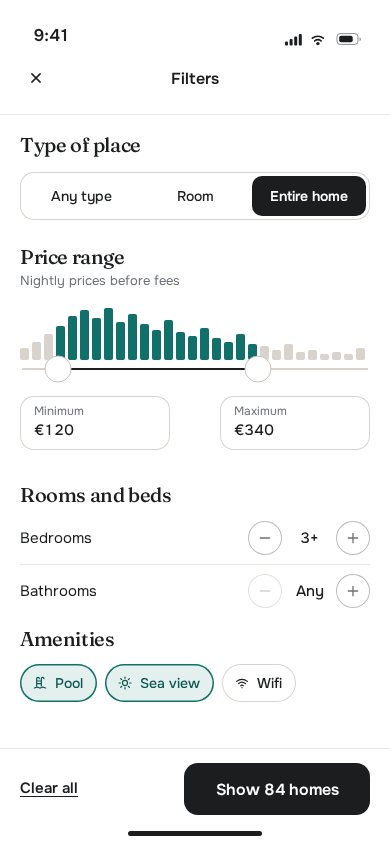
Staya is a complete stays app: welcome, sign in and a code, an explore feed with categories, search, a date range calendar, guests and filters, a map with price pins, a listing with amenities and its host, a photo tour, reviews, confirm and pay with a booking confirmation, wishlists, trips with an upcoming stay and live arrival directions, an inbox and a chat with the host, a hosting dashboard, notifications, a Plus plan, profile and settings. White and warm stone with lagoon teal.
| Detail | Value |
|---|---|
| Screen type | Search |
| App | Staya: Homes and stays from local hosts |
| Category | Travel |
| Design language | Minimal, light |
| Type | Fraunces for headings, Onest for text |
| Colours | #ffffff background, #f5f3ef surface, #1b1d1f text, #6e7277 text-muted, #12706a accent, #ffffff accent-contrast, #e3f0ee secondary, #ebe8e3 border, #d6453d danger |
What this screen says
- Filters
- Type of place
- Any type Room Entire home
- Price range
- Nightly prices before fees
- Minimum €120
- Maximum €340
- Rooms and beds
- Bedrooms
- Bathrooms
- Any
- Amenities
- Pool Sea view Wifi
- Clear all
- Show 84 homes
Around it in Staya
More search and explore screens
- Nomad Search: Travel eSIM data plans
- Tern Search: Ferry and island hopping
- Berth Search: Night trains and sleeper cabins
- Caravan Find a van: Campervan rental and road trips
- Layover Explore: Airport guide, gates and lounges
- Permit Check entry: Visas and travel documents wallet
- Backroad Along the route: Road trip planner with stops
- Bunk Search: Hostels and backpacker meetups
- Piazza Explore: Self-guided city walking tours
- Fjord Excursions: Cruise companion on board
- Atlas Explore nearby: Maps and navigation
- Kerb Search: Parking that reads like a road sign
Every travel app search screen
What makes a good search screen
- Show something before people type. Recent searches, popular items or categories make the empty search screen useful and save typing.
- Suggest as people type. Autocomplete with matching items, not only matching words, lets people jump straight to a result.
- Make filters visible and reversible. Show active filters as chips that can be removed in one tap, and the number of results as filters change.
- Forgive typos. Close matches and "Did you mean" stop a spelling mistake from ending in an empty screen.
The full search screen guide and every example
Remix Staya free: describe your own app and it is drawn in this design. Or get its files from $10: Figma, React Native, SwiftUI, Flutter and HTML.