Templates · Search and explore screens · Travel app · Permit
Permit Check entry screen
A search screen from Permit, a visas and travel documents wallet app template in a Clinical style. Screen 8 of 25.
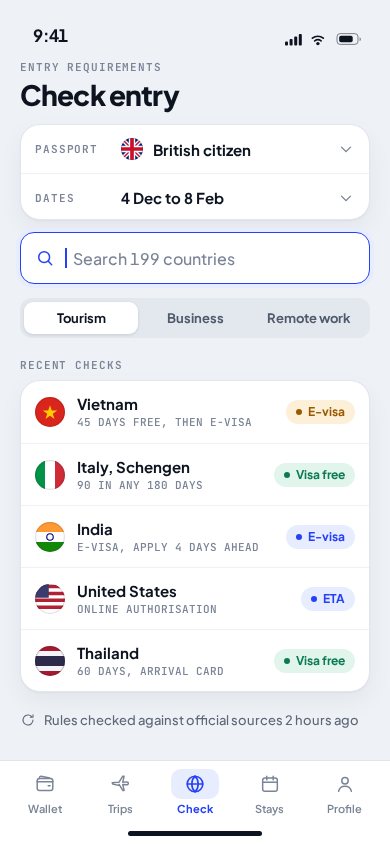
Permit is a complete travel documents wallet: welcome, sign in, a passport scan, a wallet of passports, visas and cards, the passport data page, every document, a trip with entry readiness per country, an entry requirements check and the rules for one country, a travel authorisation, an e-visa application with a compliant photo, review and pay and a submitted screen, live application status, a 90 in 180 day stay counter, a validity timeline, add a document, a secure share link, border mode, family passports, alerts, a Plus plan, profile and settings. Paper grey and white with cobalt, navy and quiet status colours.
| Detail | Value |
|---|---|
| Screen type | Search |
| App | Permit: Visas and travel documents wallet |
| Category | Travel |
| Design language | Clinical, light |
| Type | JetBrains Mono for headings, Plus Jakarta Sans for text |
| Colours | #eef1f5 background, #ffffff surface, #0d1420 text, #5d6778 text-muted, #2541f5 accent, #ffffff accent-contrast, #14213d secondary, #e1e6ee border, #c42a30 danger, #0b7a55 success, #9a5a00 warning |
What this screen says
- Entry requirements
- Check entry
- Passport
- British citizen
- Dates
- 4 Dec to 8 Feb
- Search 199 countries
- Tourism Business Remote work
- Recent checks
- Vietnam
- 45 DAYS FREE, THEN E-VISA
- E-visa
- Italy, Schengen
- 90 IN ANY 180 DAYS
- Visa free
- India
- E-VISA, APPLY 4 DAYS AHEAD
- United States
- ONLINE AUTHORISATION
- ETA
- Thailand
- 60 DAYS, ARRIVAL CARD
- Rules checked against official sources 2 hours ago
- Wallet
- Trips
- Check
- Stays
- Profile
Around it in Permit
More search and explore screens
- Aloft Add flight: Flight tracker
- Pitch Find campsites: Campsite booking and trip kit
- Hail Where to: Ride hailing
- Volta Map: EV charging
- Museo Collection: Museum guide
- Roamly Explore: Trips, stays and experiences
- Jaunt Search: Bus, train and flight booking
- Spoke Search: Bike sharing
- Navara Explore: Yacht charter
- Voya Search: Travel booking
- Wheelhouse Destination: Driver app for ride hailing
- Fuelup Stations: Pay at the pump and car wash
Every travel app search screen
What makes a good search screen
- Show something before people type. Recent searches, popular items or categories make the empty search screen useful and save typing.
- Suggest as people type. Autocomplete with matching items, not only matching words, lets people jump straight to a result.
- Make filters visible and reversible. Show active filters as chips that can be removed in one tap, and the number of results as filters change.
- Forgive typos. Close matches and "Did you mean" stop a spelling mistake from ending in an empty screen.
The full search screen guide and every example
Remix Permit free: describe your own app and it is drawn in this design. Or get its files from $10: Figma, React Native, SwiftUI, Flutter and HTML.