Templates · Settings screens · Finance app · Standing
Standing Settings screen
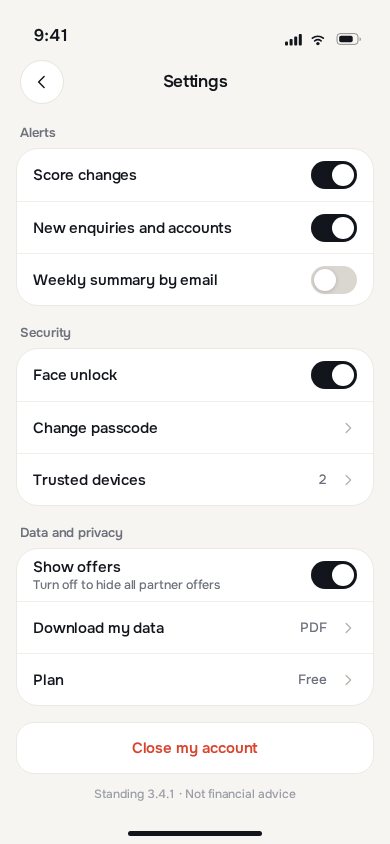
A settings screen from Standing, a credit score and reports app template in a Minimal style. Screen 25 of 25.
Standing is a complete credit score app: welcome, sign up and identity check, a home with the score dial and what changed, score history across two bureaus, the six score factors with card use and payment history in depth, the full report with accounts, an account page and enquiries, a dispute with confirmation, alerts with a was this you check, a score simulator, identity monitoring with a breach, matched card and loan offers clearly marked as offers with an application and a sent screen, a Plus plan, profile and settings. Paper and white with ink and a coral to green score scale.
| Detail | Value |
|---|---|
| Screen type | Settings |
| App | Standing: Credit score and reports |
| Category | Finance |
| Design language | Minimal, light |
| Type | Fraunces for headings, Onest for text |
| Colours | #f6f5f1 background, #ffffff surface, #12151c text, #6d717b text-muted, #12151c accent, #ffffff accent-contrast, #4a4cf0 secondary, #e7e5de border, #d9442e danger |
What this screen says
- Settings
- Alerts
- Score changes
- New enquiries and accounts
- Weekly summary by email
- Security
- Face unlock
- Change passcode
- Trusted devices
- Data and privacy
- Show offers
- Turn off to hide all partner offers
- Download my data
- Plan
- Free
- Close my account
- Standing 3.4.1 · Not financial advice
Around it in Standing
More settings screens
- Ticker Settings: Stock investing
- Burrow Settings: Shared savings pots
- Remit Settings: International money transfer
- Piggy Settings: Pocket money for kids
- Settle Settings: Bill payments and banking
- Fathom Security: Crypto wallet
- Marigold Card settings: Mobile banking
- Zentra Settings: Crypto trading
- Payday Settings: Payroll for small teams
- Roundup Settings: Invest your spare change
- Envelope Settings: Give every dollar a job
- Recur Settings: Track and cancel subscriptions
Every finance app settings screen
What makes a good settings screen
- Group options into clear sections. Account, notifications, privacy, appearance and help, with headings, so people scan to the right group.
- Label settings by their effect. "Daily reminder at 8:00" is clearer than "Reminders". Add a short description under options that need one.
- Use the right control. Toggles for on and off, a row that opens a list for choices, and sliders only for ranges.
- Apply changes immediately. Most mobile settings take effect when changed, with no Save button to forget.
The full settings screen guide and every example
Remix Standing free: describe your own app and it is drawn in this design. Or get its files from $10: Figma, React Native, SwiftUI, Flutter and HTML.