Templates · Settings screens · Finance app · Payday
Payday Settings screen
A settings screen from Payday, a payroll for small teams app template in an Enterprise style. Screen 25 of 25.
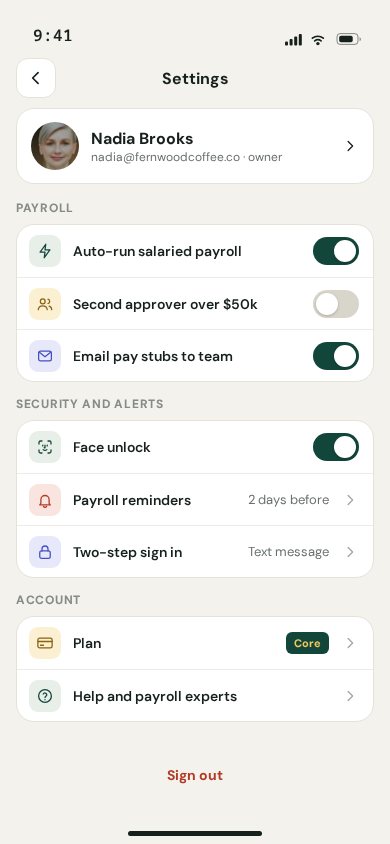
Payday is a complete payroll app for a small team: welcome, sign in and a code check, a company home with the next pay run, entering hours, a review with a cost breakdown, a slide to submit approval and a submitted timeline, pay run history and detail, a perforated pay stub, the team list, an employee record, adding an employee or contractor, time off requests with an approval view, benefits and a retirement plan, tax filings and a filed return, cost reports, plans, notifications, the company profile and settings. Warm paper and white with deep spruce, gold and cheque guilloche lines.
| Detail | Value |
|---|---|
| Screen type | Settings |
| App | Payday: Payroll for small teams |
| Category | Finance |
| Design language | Enterprise, light |
| Type | Space Grotesk for headings, DM Sans for text |
| Colours | #f3f2ec background, #ffffff surface, #16201c text, #6a716c text-muted, #12463a accent, #ffffff accent-contrast, #f4c95d secondary, #e4e2d9 border, #c8442f danger |
What this screen says
- Settings
- Nadia Brooks
- nadia@fernwoodcoffee.co · owner
- Payroll
- Auto-run salaried payroll
- Second approver over $50k
- Email pay stubs to team
- Security and alerts
- Face unlock
- Payroll reminders 2 days before
- Two-step sign in Text message
- Account
- Plan Core
- Help and payroll experts
- Sign out
Around it in Payday
More settings screens
- Divvy Settings: Split bills with friends
- Ticker Settings: Stock investing
- Burrow Settings: Shared savings pots
- Remit Settings: International money transfer
- Piggy Settings: Pocket money for kids
- Settle Settings: Bill payments and banking
- Fathom Security: Crypto wallet
- Marigold Card settings: Mobile banking
- Zentra Settings: Crypto trading
- Roundup Settings: Invest your spare change
- Envelope Settings: Give every dollar a job
- Recur Settings: Track and cancel subscriptions
Every finance app settings screen
What makes a good settings screen
- Group options into clear sections. Account, notifications, privacy, appearance and help, with headings, so people scan to the right group.
- Label settings by their effect. "Daily reminder at 8:00" is clearer than "Reminders". Add a short description under options that need one.
- Use the right control. Toggles for on and off, a row that opens a list for choices, and sliders only for ranges.
- Apply changes immediately. Most mobile settings take effect when changed, with no Save button to forget.
The full settings screen guide and every example
Remix Payday free: describe your own app and it is drawn in this design. Or get its files from $10: Figma, React Native, SwiftUI, Flutter and HTML.