Templates · Live tracking screens · Lifestyle app · Splice
Splice Exporting screen
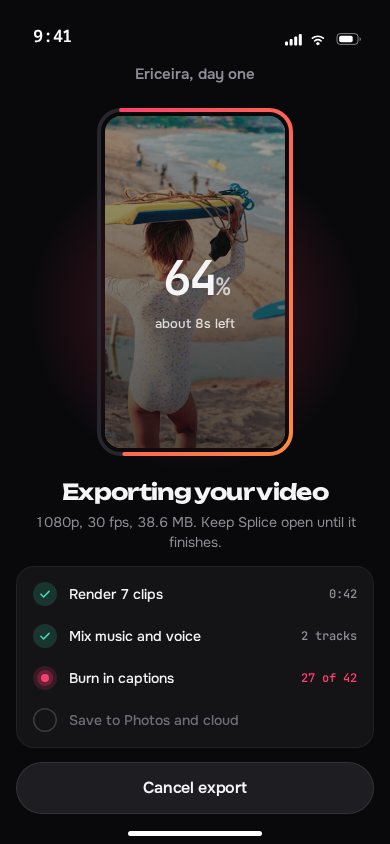
A tracking screen from Splice, a video editor for short clips app template in a Dark-first style. Screen 18 of 25.
Splice is a complete short video editor: welcome and sign in, a home with a new project card, quick tools and drafts, a camera with segment recording, a media picker, the multi-track editor, clip trim, speed curves, text styling, auto captions, a sound library, effects, filters and adjust, canvas and background, templates and a template preview, export settings, live export progress and a saved screen, drafts, cloud storage stats, notifications, a Pro plan, profile and settings. Near black with a hot pink to tangerine gradient and colour coded timeline lanes.
| Detail | Value |
|---|---|
| Screen type | Tracking |
| App | Splice: Video editor for short clips |
| Category | Lifestyle |
| Design language | Dark-first, dark |
| Type | Unbounded for headings, Onest for text |
| Colours | #09090b background, #141417 surface, #f5f5f7 text, #8e8e98 text-muted, #ff3d6e accent, #ffffff accent-contrast, #ffc23d secondary, #26262c border, #ff5a52 danger |
What this screen says
- Ericeira, day one
- about 8s left
- Exporting your video
- 1080p, 30 fps, 38.6 MB. Keep Splice open until it finishes.
- Render 7 clips 0:42
- Mix music and voice 2 tracks
- Burn in captions 27 of 42
- Save to Photos and cloud
- Cancel export
Around it in Splice
More live tracking screens
- Haul Track order: Bargain fashion and finds
- Muse Generating: AI image studio
- Arcade Downloads: Game store, library and friends
- Natal Moon: Birth charts and daily astrology
- Sillage Wearing now: Fragrance wardrobe
- Hamper Delivery: Wishlists and gift registry
- Fade Queue: Barber booking
- Inked Aftercare: Tattoo artists and bookings
- Scrapbook Track order: Digital scrapbook journal
- Rinse Pickup: Laundry pickup and delivery
- Emporia Track order: Everything store
- Sable Order: Fashion store
Every lifestyle app tracking screen
What makes a good live tracking screen
- The live number is the hero. Arrival time, pace, distance or time left, in large type at the top or centre.
- Show status in words. "Driver is 3 minutes away" or "Halfway there" alongside the map or chart.
- Make it readable while moving. Large numbers, high contrast and big buttons for pause, stop or call.
- Keep updates calm. Smooth movement on the map and steady numbers; jumpy updates feel broken.
The full live tracking screen guide and every example
Remix Splice free: describe your own app and it is drawn in this design. Or get its files from $10: Figma, React Native, SwiftUI, Flutter and HTML.