Templates · Form and input screens · Lifestyle app · Specs
Specs Coatings screen
A form screen from Specs, a glasses with virtual try-on app template in a Luxury style. Screen 12 of 25.
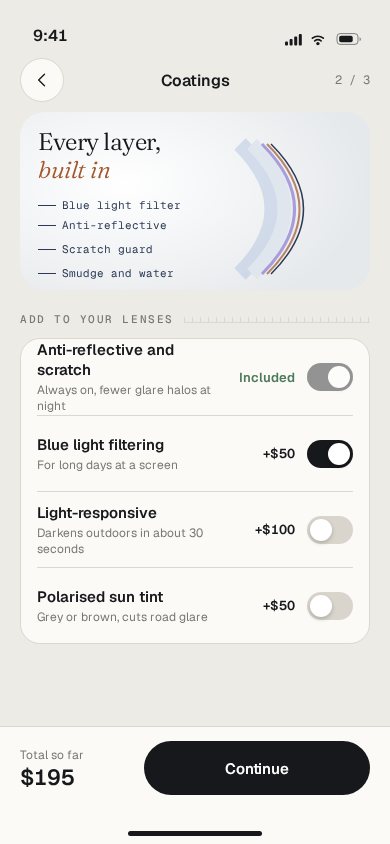
Specs is a complete eyewear app: welcome, a fit quiz, sign in, a shop home, browse and filters by width, shape and colour, a frame page with its measurements, a camera try-on with frames on your face, saved looks to compare, a five frame home try-on box, lenses, coatings and prescription, bag, checkout and order placed, lab tracking, eye exam booking and confirmation, contacts reorder, an eye health dashboard, a club plan, notifications, profile and settings. Stone and porcelain with ink and tortoise amber.
| Detail | Value |
|---|---|
| Screen type | Form |
| App | Specs: Glasses with virtual try-on |
| Category | Lifestyle |
| Design language | Luxury, light |
| Type | Fraunces for headings, Geist for text |
| Colours | #ecebe6 background, #fbfaf7 surface, #17181c text, #7b7870 text-muted, #a3562a accent, #ffffff accent-contrast, #2c3a55 secondary, #dcd8cf border, #b5432f danger |
What this screen says
- Coatings
- Every layer,
- built in
- Blue light filter Anti-reflective Scratch guard Smudge and water
- Add to your lenses
- Anti-reflective and scratchAlways on, fewer glare halos at night
- Included
- Blue light filteringFor long days at a screen
- Light-responsiveDarkens outdoors in about 30 seconds
- Polarised sun tintGrey or brown, cuts road glare
- Total so far $195
- Continue
Around it in Specs
More form and input screens
- Rewear Make an offer: Secondhand fashion marketplace
- Laced Release alert: Sneaker drops and raffles
- Gloss Write a review: Salon and spa booking
- Vow Add expense: Wedding planner
- Drizzle Edit widget: Weather with living skies
- Shelf Log progress: Reading tracker and book club
- Marquee Write a review: Cinema tickets and watchlist
- Handy Address: Home services
- Tasker Task details: Book and do local odd jobs
- Toolbox Calculator: Hardware store and project lists
- Brief Poll: News in sixty words
- Kibble Edit autoship: Pet supplies and autoship
Every lifestyle app form screen
What makes a good form screen
- Ask only what you need. Every field is a reason to stop. Remove optional fields or move them to later.
- Labels above fields. Visible labels stay readable while people type; placeholder-only labels disappear.
- Use the right keyboard and input. Number pads for amounts, email keyboards for email, pickers for dates and autofill for addresses and codes.
- Validate as people go. Show problems next to the field when people leave it, in words that say how to fix them.
The full form screen guide and every example
Remix Specs free: describe your own app and it is drawn in this design. Or get its files from $10: Figma, React Native, SwiftUI, Flutter and HTML.