Templates · List and feed screens · Social app · Spark
Spark Notifications screen
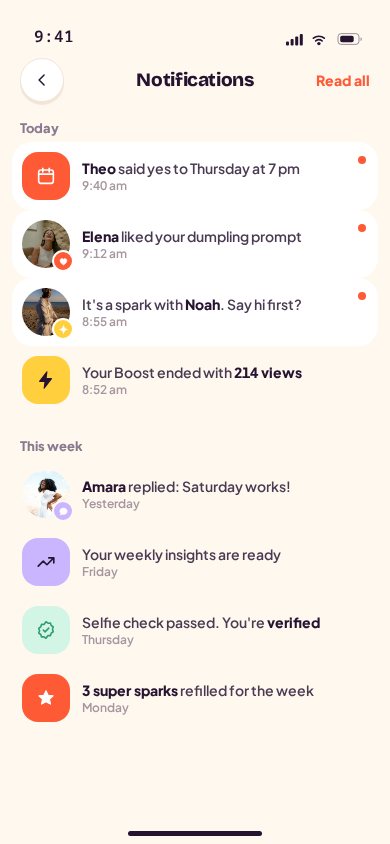
A list screen from Spark, a swipe dating app template in a Playful style. Screen 22 of 25.
Spark is a complete swipe dating app: welcome, phone sign in and code, the basics and photos, a discover deck with a common ground sticker, a full profile with prompts, filters, the match moment, likes behind a paywall, chats with new matches, a conversation that turns into a date plan, a video date with icebreakers, answering a prompt, edit profile, buying and running a Boost, booking the date and its confirmation, explore rooms, insights, notifications, a Plus plan, your profile and settings. Warm cream with tangerine, butter yellow, lilac and deep plum.
| Detail | Value |
|---|---|
| Screen type | List |
| App | Spark: Swipe dating |
| Category | Social |
| Design language | Playful, light |
| Type | Bricolage Grotesque for headings, Plus Jakarta Sans for text |
| Colours | #fff8ef background, #ffffff surface, #26132f text, #8a7a8f text-muted, #ff5a36 accent, #ffffff accent-contrast, #ffcf3d secondary, #f1e6d8 border, #e5384f danger |
What this screen says
- Notifications
- Read all
- Today
- Theo said yes to Thursday at 7 pm9:40 am
- Elena liked your dumpling prompt9:12 am
- It's a spark with Noah. Say hi first?8:55 am
- Your Boost ended with 214 views8:52 am
- This week
- Amara replied: Saturday works!Yesterday
- Your weekly insights are readyFriday
- Selfie check passed. You're verifiedThursday
- 3 super sparks refilled for the weekMonday
Around it in Spark
More list and feed screens
- Quorum Comments: Questions and expert answers
- Backer Community: Support creators with memberships
- Pledge Rewards: Back creative projects
- Civic My requests: Report issues and city services
- Guild Messages: Community servers with voice and text chat
- Parrot Calls: Private messaging, groups and calls
- Carrier Channels: Cloud messaging with channels
- Vista Comments: Photos, stories and reels
- Flick Following: Short video feed
- Squawk Topic: Short posts and live conversation
- Agora Comments: Communities, threads and votes
- Candid Comments: One real photo a day
What makes a good list screen
- Show what people need to decide. Each row should carry just enough to choose: a title, one or two details and a status. Everything else belongs on the detail screen.
- Keep rows consistent. The same information in the same place on every row lets people scan down a column instead of reading each item.
- Group with headings. Dates, categories or status headings break long lists into chunks people can skip through.
- Make common actions quick. Swipe actions, a checkbox or a heart on the row save opening the item for small tasks.
The full list screen guide and every example
Remix Spark free: describe your own app and it is drawn in this design. Or get its files from $10: Figma, React Native, SwiftUI, Flutter and HTML.