Templates · List and feed screens · Music app · Sonata
Sonata My tickets screen
A list screen from Sonata, a concert hall season and tickets app template in a Clinical style. Screen 15 of 25.
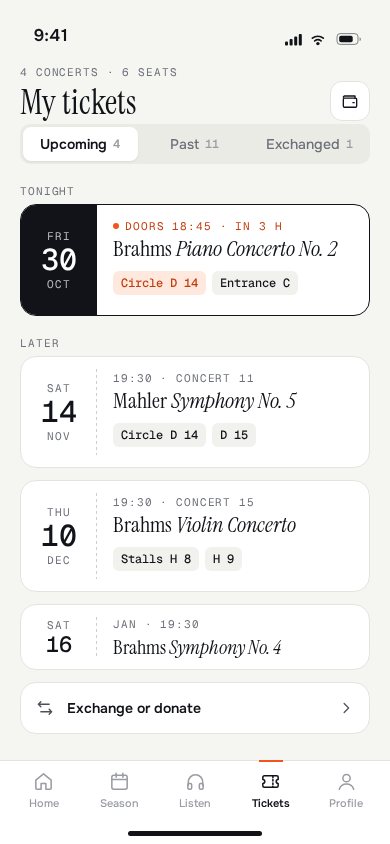
Sonata is a complete concert hall app for the Aldine Symphony Orchestra: welcome, taste setup, sign in, a home with tonight's concert, the season by month, search with filters, a concert page with its running order drawn on a stave, programme notes, a performer, a precise seat map with the view from the seat, review, payment and a booked ticket, my tickets and a wallet ticket, a live programme that follows the concert movement by movement, pre-concert listening, a build your own series form, membership, season stats, ticket exchange, notifications, profile and settings. Paper white and ink with signal orange.
| Detail | Value |
|---|---|
| Screen type | List |
| App | Sonata: Concert hall season and tickets |
| Category | Music |
| Design language | Clinical, light |
| Type | Instrument Serif for headings, Onest for text |
| Colours | #f5f5f2 background, #ffffff surface, #111318 text, #6d7079 text-muted, #f2541b accent, #ffffff accent-contrast, #ffe8de secondary, #e4e4df border, #d6331a danger |
What this screen says
- 4 concerts · 6 seats
- My tickets
- Upcoming 4Past 11Exchanged 1
- Tonight
- Fri
- Oct
- Doors 18:45 · in 3 h
- Brahms Piano Concerto No. 2
- Circle D 14Entrance C
- Later
- Sat
- Nov
- 19:30 · Concert 11
- Mahler Symphony No. 5
- Circle D 14D 15
- Thu
- Dec
- 19:30 · Concert 15
- Brahms Violin Concerto
- Stalls H 8H 9
- Jan · 19:30
- Brahms Symphony No. 4
- Exchange or donate
- Home
- Season
- Listen
- Tickets
- Profile
Around it in Sonata
More list and feed screens
- Fork Presets: Tuner and metronome
- Belt Clips: Karaoke nights
- Crowd Diary: Concert diary and setlists
- Dial City: Internet radio from everywhere
- Chorus Course: Singing lessons and pitch training
- Verse Songs: Songwriting notebook
- Masters Catalog: Royalties and streams for artists
- Quire Library: Sheet music and practice
- Wax Queue: Music streaming
- Earshot Notifications: Podcast player
- Strum Notifications: Learn guitar, one chord at a time
- Gigly Lineup: Gig and festival tickets
What makes a good list screen
- Show what people need to decide. Each row should carry just enough to choose: a title, one or two details and a status. Everything else belongs on the detail screen.
- Keep rows consistent. The same information in the same place on every row lets people scan down a column instead of reading each item.
- Group with headings. Dates, categories or status headings break long lists into chunks people can skip through.
- Make common actions quick. Swipe actions, a checkbox or a heart on the row save opening the item for small tasks.
The full list screen guide and every example
Remix Sonata free: describe your own app and it is drawn in this design. Or get its files from $10: Figma, React Native, SwiftUI, Flutter and HTML.