Templates · Form and input screens · Social app · Soapbox
Soapbox New poll screen
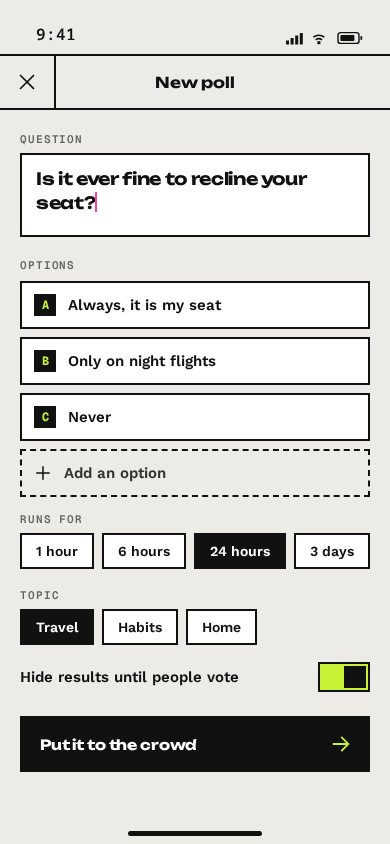
A form screen from Soapbox, a weekly debates and polls app template in a Brutalist style. Screen 13 of 25.
Soapbox is a complete weekly debate and poll app: welcome, picking topics, sign in, a home with this week's motion and its live split, the motion in full, takes from both sides with rebuttals, writing a take and getting on the box, a live Friday floor round, quick polls with results, making a poll, the Sunday verdict with a swing chart, your record, the archive, explore and topics, proposing and ranking next week's motion, notifications, a Loud plan with checkout, profile and settings. Concrete grey, ink, hot pink and acid lime.
| Detail | Value |
|---|---|
| Screen type | Form |
| App | Soapbox: Weekly debates and polls |
| Category | Social |
| Design language | Brutalist, light |
| Type | Unbounded for headings, Work Sans for text |
| Colours | #ecebe5 background, #ffffff surface, #111111 text, #66655e text-muted, #ff3ea5 accent, #111111 accent-contrast, #c6f135 secondary, #111111 border, #ff3ea5 danger |
What this screen says
- New poll
- QUESTION
- Is it ever fine to recline your seat?
- OPTIONS
- A Always, it is my seat
- B Only on night flights
- C Never
- Add an option
- RUNS FOR
- 1 hour
- 6 hours
- 24 hours
- 3 days
- TOPIC
- Travel
- Habits
- Home
- Hide results until people vote
- Put it to the crowd
Around it in Soapbox
More form and input screens
- Civic Pin location: Report issues and city services
- Guild Create server: Community servers with voice and text chat
- Parrot Your profile: Private messaging, groups and calls
- Carrier New channel: Cloud messaging with channels
- Vista New post: Photos, stories and reels
- Flick Share: Short video feed
- Squawk Compose: Short posts and live conversation
- Agora Reply: Communities, threads and votes
- Spark About you: Swipe dating
- Candid Review: One real photo a day
- Blink Send to: Camera chat and stories
- Cipher Disappearing messages: Encrypted private messenger
What makes a good form screen
- Ask only what you need. Every field is a reason to stop. Remove optional fields or move them to later.
- Labels above fields. Visible labels stay readable while people type; placeholder-only labels disappear.
- Use the right keyboard and input. Number pads for amounts, email keyboards for email, pickers for dates and autofill for addresses and codes.
- Validate as people go. Show problems next to the field when people leave it, in words that say how to fix them.
The full form screen guide and every example
Remix Soapbox free: describe your own app and it is drawn in this design. Or get its files from $10: Figma, React Native, SwiftUI, Flutter and HTML.