Templates · Form and input screens · Productivity app · Shortlist
Shortlist Apply screen
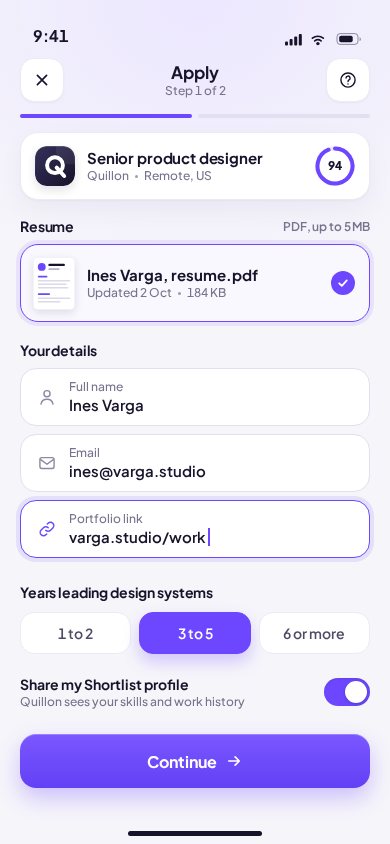
A form screen from Shortlist, a job search and application tracker app template in an Enterprise style. Screen 13 of 25.
Shortlist is a complete job search app: welcome, sign in, a code and job preferences, a home with today's interview, the pipeline and top matches, search with filters and saved searches, a job page with a match breakdown, the company, a two step application with review and a sent confirmation, a tracker board, one application's timeline, the interview, prep questions with a practice timer, salary insights with a pay distribution, an offer breakdown, a Plus plan, notifications, profile and settings. Every company has its own drawn monogram and every role shows how well it matches.
| Detail | Value |
|---|---|
| Screen type | Form |
| App | Shortlist: Job search and application tracker |
| Category | Productivity |
| Design language | Enterprise, light |
| Type | Plus Jakarta Sans |
| Colours | #f6f5fa background, #ffffff surface, #17132b text, #77738c text-muted, #6c47ff accent, #ffffff accent-contrast, #12a56b secondary, #eceaf4 border, #e5484d danger |
What this screen says
- Apply
- Step 1 of 2
- Senior product designer
- QuillonRemote, US
- ResumePDF, up to 5 MB
- Ines Varga, resume.pdf
- Updated 2 Oct184 KB
- Your details
- Full name
- Ines Varga
- ines@varga.studio
- Portfolio link
- varga.studio/work
- Years leading design systems
- 1 to 2 3 to 5 6 or more
- Share my Shortlist profile
- Quillon sees your skills and work history
- Continue
Around it in Shortlist
More form and input screens
- Aide Command: Executive AI assistant
- Juno New chat: AI chat assistant
- Opal New task: Studio dashboard
- Jot Format: Quick notes and checklists
- Chrono Planner: World clock, timers and stopwatch
- Frontdesk Reply: Customer support inbox
- Campaign New campaign: Email marketing campaigns
- Outpost Compose: Schedule social posts
- Pageview Compare: Website analytics
- Polish Rewrite: Writing assistant and keyboard
- Tapline Add link: Link-in-bio pages and analytics
- Quill Insert block: Docs, wikis and databases in one workspace
Every productivity app form screen
What makes a good form screen
- Ask only what you need. Every field is a reason to stop. Remove optional fields or move them to later.
- Labels above fields. Visible labels stay readable while people type; placeholder-only labels disappear.
- Use the right keyboard and input. Number pads for amounts, email keyboards for email, pickers for dates and autofill for addresses and codes.
- Validate as people go. Show problems next to the field when people leave it, in words that say how to fix them.
The full form screen guide and every example
Remix Shortlist free: describe your own app and it is drawn in this design. Or get its files from $10: Figma, React Native, SwiftUI, Flutter and HTML.