Templates · List and feed screens · Fitness app · Segment
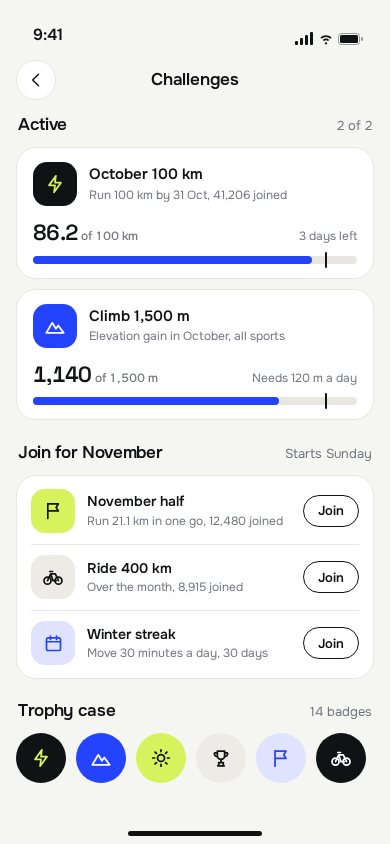
Segment Challenges screen
A list screen from Segment, a runs and rides with friends app template in a Minimal style. Screen 21 of 25.
Segment is a complete social running and riding app: welcome, sports and weekly goal, sign in, a friends feed with route maps, an activity with splits and segments, cheers and comments, a route replay, segment leaderboards, a segment map, search, saved routes and a route planner, recording with live stats and segment alerts, saving a run and its PRs, progress, clubs, a club page, joining a group run, challenges, notifications, a Plus plan, profile and settings. Paper and white with ink, cobalt and a chartreuse highlight.
| Detail | Value |
|---|---|
| Screen type | List |
| App | Segment: Runs and rides with friends |
| Category | Health and fitness |
| Design language | Minimal, light |
| Type | Space Grotesk for headings, Onest for text |
| Colours | #f5f5f2 background, #ffffff surface, #111214 text, #74777e text-muted, #2443ff accent, #ffffff accent-contrast, #d6f25c secondary, #e8e7e2 border, #ef4a3c danger |
What this screen says
- Challenges
- Active
- 2 of 2
- October 100 kmRun 100 km by 31 Oct, 41,206 joined
- 86.2of 100 km 3 days left
- Climb 1,500 mElevation gain in October, all sports
- 1,140of 1,500 m Needs 120 m a day
- Join for November
- Starts Sunday
- November halfRun 21.1 km in one go, 12,480 joined
- Join
- Ride 400 kmOver the month, 8,915 joined
- Winter streakMove 30 minutes a day, 30 days
- Trophy case
- 14 badges
Around it in Segment
More list and feed screens
- Vantage Activities: Sports watch companion
- Labwork Results: Book blood tests and see results
- Nightly Journal: Smart ring sleep and readiness
- Pillbox Medicines: Pharmacy refills and medicine reminders
- Rise Alarms: Alarm clock and sleep cycles
- Ward Visits: Patient portal for results, visits and messages
- Level Logbook: Glucose monitor companion
- Reformer Schedule: Pilates studio booking
- Sip History: Water intake and hydration
- Mend Plan: Physio and rehab exercises
- Tabata History: HIIT interval timer
- Jab History: Boxing workouts with a smart bag
What makes a good list screen
- Show what people need to decide. Each row should carry just enough to choose: a title, one or two details and a status. Everything else belongs on the detail screen.
- Keep rows consistent. The same information in the same place on every row lets people scan down a column instead of reading each item.
- Group with headings. Dates, categories or status headings break long lists into chunks people can skip through.
- Make common actions quick. Swipe actions, a checkbox or a heart on the row save opening the item for small tasks.
The full list screen guide and every example
Remix Segment free: describe your own app and it is drawn in this design. Or get its files from $10: Figma, React Native, SwiftUI, Flutter and HTML.