Templates · List and feed screens · Sports app · Scoreboard
Scoreboard Schedule screen
A list screen from Scoreboard, a sports app template in a Dark-first style. Screen 12 of 25.
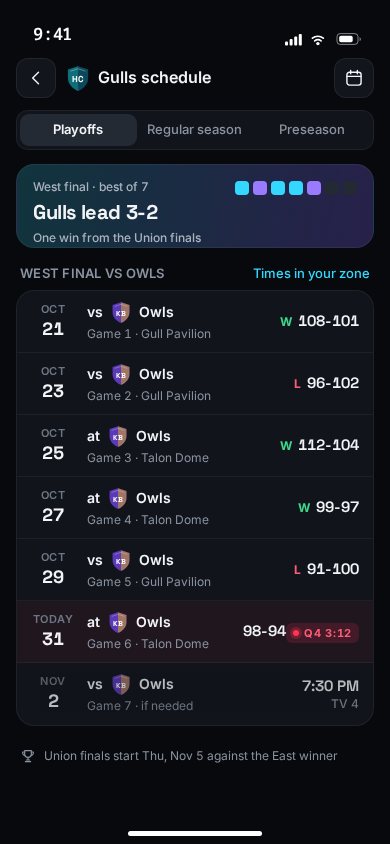
Scoreboard is a complete sports scores app: welcome, pick your teams and sign in, a scores home across six invented leagues with a live game hero, a game cast with a drawn court, win probability and last plays, the full play by play and box score, a highlight player, standings, a team page, a player page with season stats, a schedule, news and an article, search, my teams, score alerts, a fantasy team and a head to head matchup, the Plus plan with checkout and a welcome, notifications, profile and settings. Near black and charcoal with floodlight cyan and a live red.
| Detail | Value |
|---|---|
| Screen type | List |
| App | Scoreboard: Scores and news for every sport |
| Category | Sports |
| Design language | Dark-first, dark |
| Type | Space Grotesk for headings, Inter for text |
| Colours | #07090c background, #11151b surface, #f2f4f7 text, #8a93a1 text-muted, #34d8ff accent, #03131a accent-contrast, #ff3355 secondary, #1f252e border, #ffb020 warning |
What this screen says
- Gulls schedule
- Playoffs Regular season Preseason
- West final · best of 7
- Gulls lead 3-2
- One win from the Union finals
- WEST FINAL VS OWLSTimes in your zone
- OCT21
- vs Owls
- Game 1 · Gull Pavilion
- W108-101
- OCT23
- Game 2 · Gull Pavilion
- L96-102
- OCT25
- at Owls
- Game 3 · Talon Dome
- W112-104
- OCT27
- Game 4 · Talon Dome
- W99-97
- OCT29
- Game 5 · Gull Pavilion
- L91-100
- TODAY31
- Game 6 · Talon Dome
- 98-94Q4 3:12
- NOV2
- Game 7 · if needed
- 7:30 PMTV 4
- Union finals start Thu, Nov 5 against the East winner
Around it in Scoreboard
More list and feed screens
- Matchday Notifications: Football scores and fantasy
- Rally Notifications: Tennis and padel club
- Swell Week ahead: Surf forecast
- Pitwall Timing: Race engineering
- Elevens Matches: Fantasy cricket leagues
- Bib Calendar: Find and enter races
- Wicket Commentary: Live cricket scores
- Courtside My runs: Pickup basketball games
- Tack Regattas: Sailing wind and regatta tracker
- Frag Schedule: Esports tournaments and teams
- Canter Instructors: Riding stables and lessons
- Ollie Clips: Skate spots and clips
What makes a good list screen
- Show what people need to decide. Each row should carry just enough to choose: a title, one or two details and a status. Everything else belongs on the detail screen.
- Keep rows consistent. The same information in the same place on every row lets people scan down a column instead of reading each item.
- Group with headings. Dates, categories or status headings break long lists into chunks people can skip through.
- Make common actions quick. Swipe actions, a checkbox or a heart on the row save opening the item for small tasks.
The full list screen guide and every example
Remix Scoreboard free: describe your own app and it is drawn in this design. Or get its files from $10: Figma, React Native, SwiftUI, Flutter and HTML.