Templates · Success and confirmation screens · Travel app · Scoot
Scoot Ride summary screen
A success screen from Scoot, an e-scooter and e-bike rental app template in a Gen Z style. Screen 14 of 25.
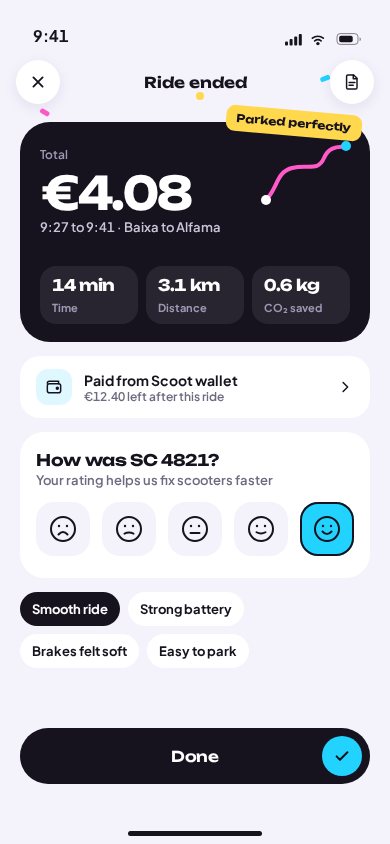
Scoot is a complete e-scooter and e-bike rental app: welcome, sign in and code, a live map of nearby scooters and bikes with battery tags, search, scooter and e-bike details with ring and reserve, parking, slow and no-go zones, scan to unlock, a live ride with timer, cost and speed, parking guidance, a parking photo, a ride summary with rating, ride history and a ride receipt, stats, passes with checkout and confirmation, a wallet, safety tips, notifications, profile and settings. Lilac and white with ink, electric cyan, hot pink and sunny yellow.
| Detail | Value |
|---|---|
| Screen type | Success |
| App | Scoot: E-scooter and e-bike rental |
| Category | Travel |
| Design language | Gen Z, light |
| Type | Unbounded for headings, Plus Jakarta Sans for text |
| Colours | #f4f2fb background, #ffffff surface, #16131f text, #6e6a80 text-muted, #22d3ff accent, #16131f accent-contrast, #ff5ac8 secondary, #e6e2f2 border, #ff4d3d danger |
What this screen says
- Ride ended
- Parked perfectly
- Total
- 9:27 to 9:41 · Baixa to Alfama
- 14 minTime
- 3.1 kmDistance
- 0.6 kgCO₂ saved
- Paid from Scoot wallet€12.40 left after this ride
- How was SC 4821?
- Your rating helps us fix scooters faster
- Smooth ride Strong battery Brakes felt soft Easy to park
- Done
Around it in Scoot
More success and confirmation screens
- Aloft Lounge pass: Flight tracker
- Pitch Booked: Campsite booking and trip kit
- Hail Arrived: Ride hailing
- Volta Charge complete: EV charging
- Museo Booked: Museum guide
- Roamly Booked: Trips, stays and experiences
- Jaunt Booked: Bus, train and flight booking
- Spoke Unlocked: Bike sharing
- Navara Confirmed: Yacht charter
- Voya Ticket: Travel booking
- Wheelhouse Trip complete: Driver app for ride hailing
- Fuelup Receipt: Pay at the pump and car wash
Every travel app success screen
What makes a good confirmation screen
- Confirm in the headline. "Payment sent", "Table booked for Friday at 8" or "Lesson complete" in plain words, with a clear success colour or icon.
- Repeat the key details. Amount, date, reference number or score, so people do not need to check elsewhere that the right thing happened.
- Say what happens next. When the order arrives, when the money lands, when the next lesson unlocks.
- Offer the next step. Track the order, add to calendar, share, or start the next lesson. One primary action and a way back home.
The full confirmation screen guide and every example
Remix Scoot free: describe your own app and it is drawn in this design. Or get its files from $10: Figma, React Native, SwiftUI, Flutter and HTML.