Templates · Onboarding screens · Travel app · Rove
Rove Your style screen
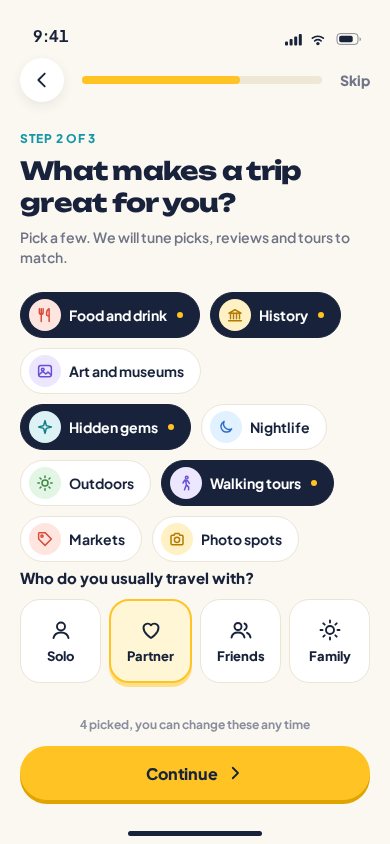
An onboarding screen from Rove, a reviews and things to do app template in a Playful style. Screen 2 of 25.
Rove is a complete travel reviews app: welcome, travel style, sign in, a home with search and a trip card, search, things to do with filters, a map with rating pins, an attraction page, traveller photos, review scores and a full review, writing a review, restaurants and a restaurant page, a small group tour, date and time picking, checkout and a booked ticket, trips and a day by day itinerary, contribution stats, notifications, a Plus plan, profile and settings. Paper and white with deep ink navy, marigold stars and lagoon teal.
| Detail | Value |
|---|---|
| Screen type | Onboarding |
| App | Rove: Reviews and things to do |
| Category | Travel |
| Design language | Playful, light |
| Type | Unbounded for headings, Plus Jakarta Sans for text |
| Colours | #fbf8f1 background, #ffffff surface, #18223a text, #6f7487 text-muted, #ffc423 accent, #18223a accent-contrast, #1597a8 secondary, #ece5d6 border, #f0604f danger |
What this screen says
- Skip
- STEP 2 OF 3
- What makes a trip great for you?
- Pick a few. We will tune picks, reviews and tours to match.
- Food and drink
- History
- Art and museums
- Hidden gems
- Nightlife
- Outdoors
- Walking tours
- Markets
- Photo spots
- Who do you usually travel with?
- Solo
- Partner
- Friends
- Family
- 4 picked, you can change these any time
- Continue
Around it in Rove
More onboarding screens
- Pitch Welcome: Campsite booking and trip kit
- Hail Welcome: Ride hailing
- Volta Welcome: EV charging
- Museo Welcome: Museum guide
- Roamly Welcome: Trips, stays and experiences
- Jaunt Welcome: Bus, train and flight booking
- Spoke Welcome: Bike sharing
- Navara Welcome: Yacht charter
- Voya Welcome: Travel booking
- Wheelhouse Welcome: Driver app for ride hailing
- Fuelup Welcome: Pay at the pump and car wash
- Omnia Welcome: Super app for rides, food and payments
Every travel app onboarding screen
What makes a good onboarding screen
- One idea per screen. Each screen should say one thing in a headline people can read in a second. If a screen needs a paragraph, it is doing too much.
- Personalise with a purpose. Ask a question only if the answer changes what people see next, like a goal, a level or an interest. Then show that the answer mattered.
- Explain permissions before asking. Show your own screen saying why you need notifications, location or the camera before the system prompt. People who understand the reason are more likely to allow it.
- Let people skip. A visible skip or "I'll do this later" respects returning users and the impatient. Make sure skipping still lands them somewhere useful.
The full onboarding screen guide and every example
Remix Rove free: describe your own app and it is drawn in this design. Or get its files from $10: Figma, React Native, SwiftUI, Flutter and HTML.