Templates · Detail screens · Travel app · Roamly
Roamly Tour plan screen
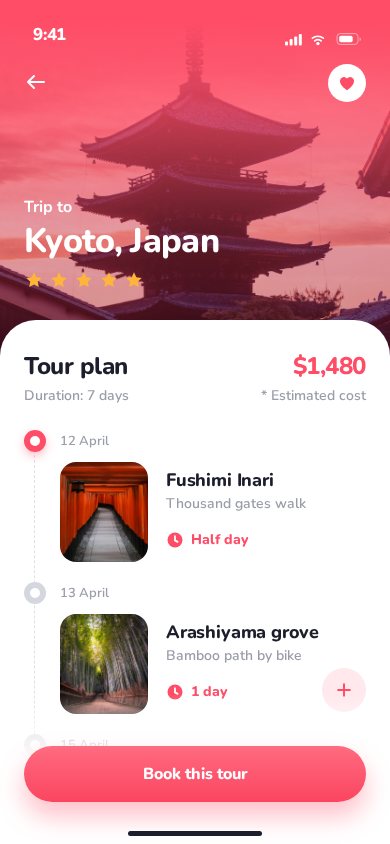
A detail screen from Roamly, a travel app template in a Playful style. Screen 11 of 25.
Roamly is a complete travel app: onboarding, sign in, a discover home with illustrated destination cards and categories, explore by type of trip, search and filters, destination, stay and experience details, a day by day tour plan, reviews, dates and guests, payment, a booking confirmation, trips, saved places, notifications, travel stats, a membership, profile and settings. White and coral red with a rounded font, tall photos and drawn travel illustrations.
| Detail | Value |
|---|---|
| Screen type | Detail |
| App | Roamly: Trips, stays and experiences |
| Category | Travel |
| Design language | Playful, light |
| Type | Nunito |
| Colours | #ffffff background, #f5f5f8 surface, #1c1e2b text, #9a9da9 text-muted, #ff4d67 accent, #ffffff accent-contrast, #2f9bff secondary, #ececf1 border, #d92d3a danger |
What this screen says
- Trip to
- Kyoto, Japan
- Tour plan
- Duration: 7 days * Estimated cost
- 12 April
- Fushimi Inari
- Thousand gates walk
- Half day
- 13 April
- Arashiyama grove
- Bamboo path by bike
- 1 day
- 15 April
- Kinkaku-ji
- Book this tour
Around it in Roamly
More detail screens
- Hollow Stay: Cabin and boutique stays
- Aloft Flight: Flight tracker
- Pitch Campsite: Campsite booking and trip kit
- Hail Safety: Ride hailing
- Volta Station: EV charging
- Museo Exhibition: Museum guide
- Jaunt Destination: Bus, train and flight booking
- Spoke Station: Bike sharing
- Navara Yacht: Yacht charter
- Voya Trip: Travel booking
- Wheelhouse Trip request: Driver app for ride hailing
- Fuelup Station: Pay at the pump and car wash
Every travel app detail screen
What makes a good detail screen
- Lead with what identifies the item. A large image or title, the price or status, and the key facts at the top. People should know they are in the right place at a glance.
- Keep the main action visible. A sticky bottom button for Add to cart, Book or Play stays reachable while people scroll through details.
- Order information by importance. The facts that decide the choice come first; reviews, specifications and fine print further down.
- Use progressive disclosure. Long descriptions, specifications and policies can expand on tap rather than filling the screen.
The full detail screen guide and every example
Remix Roamly free: describe your own app and it is drawn in this design. Or get its files from $10: Figma, React Native, SwiftUI, Flutter and HTML.