Templates · List and feed screens · Fitness app · Rise
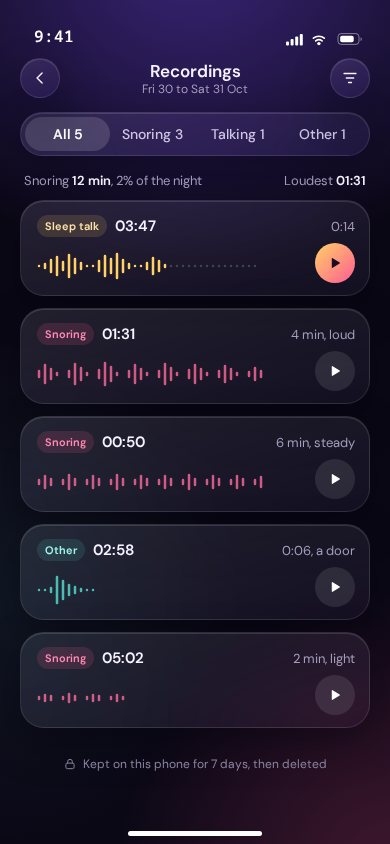
Rise Recordings screen
A list screen from Rise, an alarm clock and sleep cycles app template in a Glass style. Screen 14 of 25.
Rise is a complete smart alarm and sleep tracker: welcome, how it works, sign in, a tonight home with the horizon dial, alarms, set alarm with a wake window, wake melodies, bedtime notes, a live tracking night screen, the alarm ringing at sunrise, wake mood, a morning report, the night's sleep graph, snore and sleep talk recordings with a player, a journal, trends, how sleep notes change your nights, snoring, sleep aids with a player, a Plus plan, notifications, profile and settings. Aubergine glass with a rose to gold dawn and aqua.
| Detail | Value |
|---|---|
| Screen type | List |
| App | Rise: Alarm clock and sleep cycles |
| Category | Health and fitness |
| Design language | Glass, dark |
| Type | Unbounded for headings, DM Sans for text |
| Colours | #0b0816 background, #1b1430 surface, #f6f2ff text, #a59dbd text-muted, #ff4f87 accent, #ffffff accent-contrast, #58e3d4 secondary, #ffd166 highlight, #2a2240 border, #ff6b5e danger |
What this screen says
- RecordingsFri 30 to Sat 31 Oct
- All 5Snoring 3Talking 1Other 1
- Snoring 12 min, 2% of the night Loudest 01:31
- Sleep talk03:470:14
- Snoring01:314 min, loud
- Snoring00:506 min, steady
- Other02:580:06, a door
- Snoring05:022 min, light
- Kept on this phone for 7 days, then deleted
Around it in Rise
More list and feed screens
- Careline Calendar: Care for an ageing parent
- Velo Schedule: Live and on-demand indoor cycling
- Vantage Activities: Sports watch companion
- Labwork Results: Book blood tests and see results
- Segment Comments: Runs and rides with friends
- Nightly Journal: Smart ring sleep and readiness
- Pillbox Medicines: Pharmacy refills and medicine reminders
- Ward Visits: Patient portal for results, visits and messages
- Level Logbook: Glucose monitor companion
- Reformer Schedule: Pilates studio booking
- Sip History: Water intake and hydration
- Mend Plan: Physio and rehab exercises
What makes a good list screen
- Show what people need to decide. Each row should carry just enough to choose: a title, one or two details and a status. Everything else belongs on the detail screen.
- Keep rows consistent. The same information in the same place on every row lets people scan down a column instead of reading each item.
- Group with headings. Dates, categories or status headings break long lists into chunks people can skip through.
- Make common actions quick. Swipe actions, a checkbox or a heart on the row save opening the item for small tasks.
The full list screen guide and every example
Remix Rise free: describe your own app and it is drawn in this design. Or get its files from $10: Figma, React Native, SwiftUI, Flutter and HTML.