Templates · Onboarding screens · Social app · Ripple
Ripple Pick topics screen
An onboarding screen from Ripple, a voice notes social app template in a Dark-first style. Screen 2 of 25.
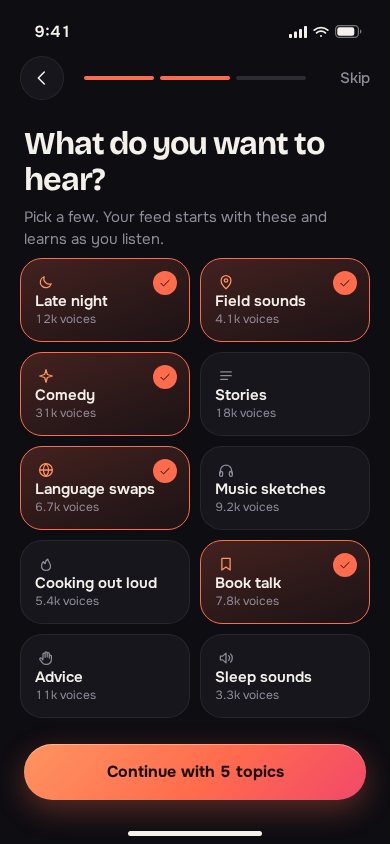
Ripple is a complete voice notes social app: welcome, topics, sign in and a code, a feed of voice notes with unheard rings, a note with a live transcript, a radial now playing screen, threaded voice replies, recording, trimming with voice tones, posting with an audience and a success screen. Also explore with moods, search inside transcripts, live rooms, voice DMs, reach stats, activity, your profile, a creator page, tipping, Ripple Plus and settings. Ink black with a coral glow and sea glass.
| Detail | Value |
|---|---|
| Screen type | Onboarding |
| App | Ripple: Voice notes social |
| Category | Social |
| Design language | Dark-first, dark |
| Type | Bricolage Grotesque for headings, Onest for text |
| Colours | #0e0d12 background, #17161d surface, #f4f0ea text, #8f8a99 text-muted, #ff6b4d accent, #1a0c08 accent-contrast, #8be3cf secondary, #2a2833 border, #ff4d6d danger |
What this screen says
- Skip
- What do you want to hear?
- Pick a few. Your feed starts with these and learns as you listen.
- Late night12k voices
- Field sounds4.1k voices
- Comedy31k voices
- Stories18k voices
- Language swaps6.7k voices
- Music sketches9.2k voices
- Cooking out loud5.4k voices
- Book talk7.8k voices
- Advice11k voices
- Sleep sounds3.3k voices
- Continue with 5 topics
Around it in Ripple
More onboarding screens
- Blink Welcome: Camera chat and stories
- Cipher Welcome: Encrypted private messenger
- Commons Welcome: Friends, groups and events
- Tether Welcome: Family location and safety
- Facet Welcome: Video calls with family and friends
- Stoop Welcome: Neighbourhood noticeboard
- Aura Welcome: Moods with close friends
- Kindly Welcome: Volunteering near you
- Cohort Welcome: Alumni and mentor network
- Kin Welcome: Private family circle
- Confetti Welcome: Party invites and RSVPs
- Duo Welcome: An app for two
Every social app onboarding screen
What makes a good onboarding screen
- One idea per screen. Each screen should say one thing in a headline people can read in a second. If a screen needs a paragraph, it is doing too much.
- Personalise with a purpose. Ask a question only if the answer changes what people see next, like a goal, a level or an interest. Then show that the answer mattered.
- Explain permissions before asking. Show your own screen saying why you need notifications, location or the camera before the system prompt. People who understand the reason are more likely to allow it.
- Let people skip. A visible skip or "I'll do this later" respects returning users and the impatient. Make sure skipping still lands them somewhere useful.
The full onboarding screen guide and every example
Remix Ripple free: describe your own app and it is drawn in this design. Or get its files from $10: Figma, React Native, SwiftUI, Flutter and HTML.