Templates · Form and input screens · Productivity app · Ringer
Ringer Record call screen
A form screen from Ringer, a productivity app template in a Minimal style. Screen 15 of 25.
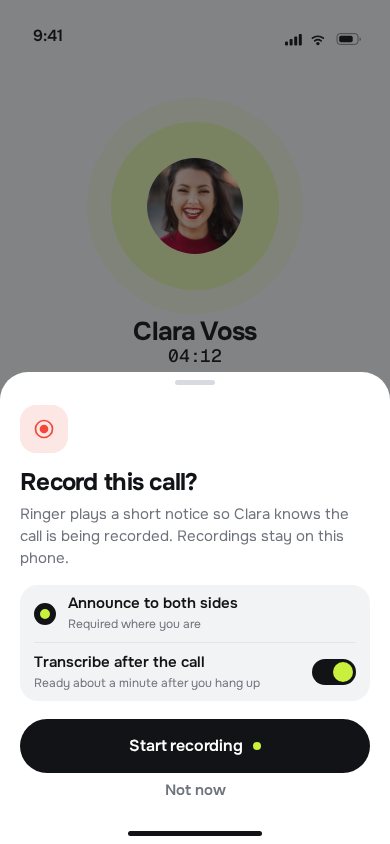
Ringer is a complete phone app: welcome, permissions, sign in with a texted code, favourites, recents with missed calls and filtered spam, call details, contacts with an alphabet index, a contact card, a new contact form, search across people and voicemail, a keypad, an incoming call, the in-call screen, a call recording consent sheet and a call summary, visual voicemail with a live transcript, a spam filter, blocking a number with a confirmation, call stats, a Plus plan, my card and settings. Porcelain and white with ink, signal lime and a coral for missed and declined calls.
| Detail | Value |
|---|---|
| Screen type | Form |
| App | Ringer: Phone, contacts and voicemail |
| Category | Productivity |
| Design language | Minimal, light |
| Type | Onest |
| Colours | #f2f3f5 background, #ffffff surface, #111316 text, #6e737c text-muted, #c8f03c accent, #111316 accent-contrast, #1b1d21 secondary, #e3e5e9 border, #f2473a danger, #b26f00 warning |
What this screen says
- Clara Voss04:12
- Record this call?
- Ringer plays a short notice so Clara knows the call is being recorded. Recordings stay on this phone.
- Announce to both sidesRequired where you are
- Transcribe after the callReady about a minute after you hang up
- Start recording
- Not now
Around it in Ringer
More form and input screens
- Ping Report issue: Internet speed test
- Glance Price alert: Visual search with the camera
- Replay New recording: Record and share screen videos
- Easel Workspace: Collaborative whiteboard
- Token Add account: Two-factor codes and sign-in approvals
- Beam Pick files: Send big files
- Parchment Text style: Documents, edit and share
- Lectern Format: Slides and presenter remote
- Pipeline Check in: Sales CRM on the road
- Aim Check in: Goals and key results
- Scribe Share: Voice memos to notes
- Inkline Sign: Sign and send contracts
Every productivity app form screen
What makes a good form screen
- Ask only what you need. Every field is a reason to stop. Remove optional fields or move them to later.
- Labels above fields. Visible labels stay readable while people type; placeholder-only labels disappear.
- Use the right keyboard and input. Number pads for amounts, email keyboards for email, pickers for dates and autofill for addresses and codes.
- Validate as people go. Show problems next to the field when people leave it, in words that say how to fix them.
The full form screen guide and every example
Remix Ringer free: describe your own app and it is drawn in this design. Or get its files from $10: Figma, React Native, SwiftUI, Flutter and HTML.