Templates · Form and input screens · Finance app · Recur
Recur Negotiate bill screen
A form screen from Recur, a track and cancel subscriptions app template in a Minimal style. Screen 12 of 25.
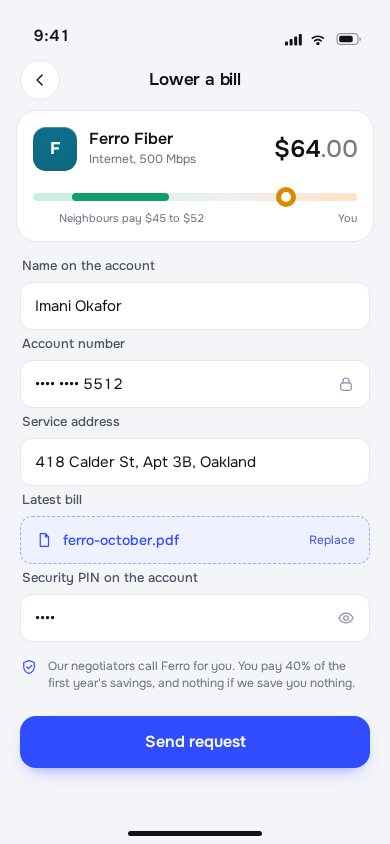
Recur is a complete subscription and bill manager: welcome, linking a bank, sign in and a code, a home with the month's renewal ring, every subscription with its next charge, a subscription page, a three step cancel flow ending in a confirmation, a price increase alert, a bill negotiation request with a live negotiation tracker, a charge calendar, spending, transactions, search, adding a subscription by hand, credit score, savings, linked accounts, notifications, a pay what you want plan, profile and settings. Cool grey and white with ink, cobalt, amber and green.
| Detail | Value |
|---|---|
| Screen type | Form |
| App | Recur: Track and cancel subscriptions |
| Category | Finance |
| Design language | Minimal, light |
| Type | Onest |
| Colours | #f4f5f8 background, #ffffff surface, #0f1218 text, #687083 text-muted, #2f4cff accent, #ffffff accent-contrast, #0f9f6e secondary, #e5e7ee border, #e5484d danger |
What this screen says
- Lower a bill
- Ferro Fiber
- Internet, 500 Mbps
- Neighbours pay $45 to $52 You
- Name on the account
- Imani Okafor
- Account number
- •••• •••• 5512
- Service address
- 418 Calder St, Apt 3B, Oakland
- Latest bill
- ferro-october.pdf Replace
- Security PIN on the account
- ••••
- Our negotiators call Ferro for you. You pay 40% of the first year's savings, and nothing if we save you nothing.
- Send request
Around it in Recur
More form and input screens
- Billfold Verify card: Cards, passes and tickets wallet
- Payly Amount: UPI payments, recharges and bills
- Crest Add card: Credit card bills and rewards
- Storefront Fulfil items: Run your online store
- Bastion Transfer: Everyday banking from a big bank
- Later Pay early: Buy now, pay in four
- Standing Dispute: Credit score and reports
- Accrue Contributions: Retirement and pension planner
- Levy Log expense: Taxes for freelancers
- Bullion Buy gold: Gold and silver savings
- Wage Cash out: Get paid as you work
- Keystone Make payment: Mortgage and home loan tracker
What makes a good form screen
- Ask only what you need. Every field is a reason to stop. Remove optional fields or move them to later.
- Labels above fields. Visible labels stay readable while people type; placeholder-only labels disappear.
- Use the right keyboard and input. Number pads for amounts, email keyboards for email, pickers for dates and autofill for addresses and codes.
- Validate as people go. Show problems next to the field when people leave it, in words that say how to fix them.
The full form screen guide and every example
Remix Recur free: describe your own app and it is drawn in this design. Or get its files from $10: Figma, React Native, SwiftUI, Flutter and HTML.