Templates · List and feed screens · Education app · Recall
Recall Cards screen
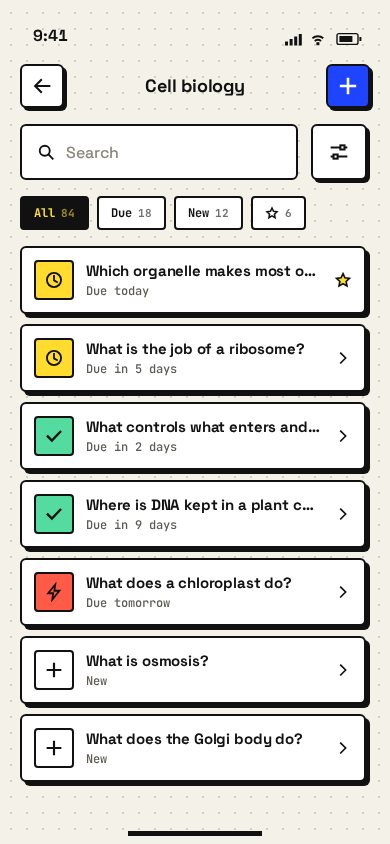
A list screen from Recall, a flashcards and spaced repetition app template in a Neubrutalism style. Screen 9 of 25.
Recall is a complete flashcard app: welcome, a daily goal, sign in and a code, a home with the cards due today, decks, a deck with its cards, a study session that flips and rates each card, a quick test, a session summary, adding cards and decks, stats with a forgetting curve, a streak calendar, shared decks, an exam countdown, a Plus plan, notifications, profile and settings. Everything is an index card: ruled, outlined in black and stacked on colour.
| Detail | Value |
|---|---|
| Screen type | List |
| App | Recall: Flashcards and spaced repetition |
| Category | Education |
| Design language | Neubrutalism, light |
| Type | Space Grotesk |
| Colours | #f4f1e8 background, #ffffff surface, #111111 text, #5c5a52 text-muted, #1f44ff accent, #ffffff accent-contrast, #ffdc2e secondary, #111111 border, #ff5b47 danger |
What this screen says
- Cell biology
- Search
- All 84 Due 18 New 12 6
- Which organelle makes most of a cell's ATP?
- Due today
- What is the job of a ribosome?
- Due in 5 days
- What controls what enters and leaves a cell?
- Due in 2 days
- Where is DNA kept in a plant cell?
- Due in 9 days
- What does a chloroplast do?
- Due tomorrow
- What is osmosis?
- New
- What does the Golgi body do?
Around it in Recall
More list and feed screens
- Tutor Reviews: Book online tutors for any skill
- Leaf Library: E-books and reading
- Almanac Contents: The free encyclopedia reader
- Tiles Archive: Daily word and number puzzles
- Stacks Loans: Borrow e-books and audiobooks from your library
- Penpal Chats: Language exchange chat
- Lexis In the wild: A word a day
- Quanta Lab notebook: Interactive physics lessons
- Cram Subjects: Exam prep and mock tests
- Quad Week: University campus app
- Palm Course: Learn sign language
- Epoch Saved: History on a timeline
Every education app list screen
What makes a good list screen
- Show what people need to decide. Each row should carry just enough to choose: a title, one or two details and a status. Everything else belongs on the detail screen.
- Keep rows consistent. The same information in the same place on every row lets people scan down a column instead of reading each item.
- Group with headings. Dates, categories or status headings break long lists into chunks people can skip through.
- Make common actions quick. Swipe actions, a checkbox or a heart on the row save opening the item for small tasks.
The full list screen guide and every example
Remix Recall free: describe your own app and it is drawn in this design. Or get its files from $10: Figma, React Native, SwiftUI, Flutter and HTML.