Templates · List and feed screens · Sports app · Rally
Rally Bookings screen
A list screen from Rally, a tennis and padel club app template in a Minimal style. Screen 12 of 25.
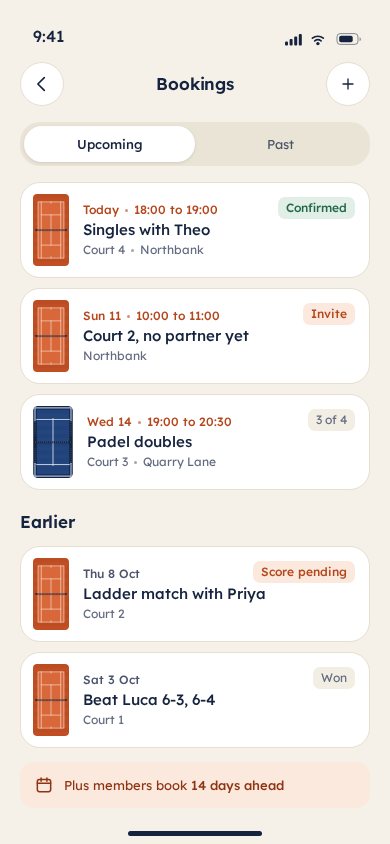
Rally is a complete racquet sports app: welcome, sign in, a code and a level check, a home with the next match, court search, a club page, booking on a court picker with time slots, payment and a confirmation, bookings, partners by level, a player page, open matches, score entry on a scoreboard, a match result, the club ladder, coaching, stats, a Plus plan, profile and settings. Clay orange marks whatever is selected, live or yours.
| Detail | Value |
|---|---|
| Screen type | List |
| App | Rally: Tennis and padel club |
| Category | Sports |
| Design language | Minimal, light |
| Type | Lexend |
| Colours | #f5f1e8 background, #ffffff surface, #15233f text, #636b80 text-muted, #d1572a accent, #ffffff accent-contrast, #15233f secondary, #e6dfd1 border, #c2372b danger |
What this screen says
- Bookings
- Upcoming
- Past
- Today18:00 to 19:00
- Singles with Theo
- Court 4Northbank
- Confirmed
- Sun 1110:00 to 11:00
- Court 2, no partner yet
- Northbank
- Invite
- Wed 1419:00 to 20:30
- Padel doubles
- Court 3Quarry Lane
- 3 of 4
- Earlier
- Thu 8 Oct
- Ladder match with Priya
- Court 2
- Score pending
- Sat 3 Oct
- Beat Luca 6-3, 6-4
- Court 1
- Won
- Plus members book 14 days ahead
Around it in Rally
More list and feed screens
- Ollie Clips: Skate spots and clips
- Eddy Rapids: River levels for paddlers
- Whistle Fixtures: Grassroots league manager for coaches
- Oche Practice: Darts scorer and leagues
- Cairn Trail list: Trails, contours and summits on one map sheet
- Lapse Drills: Swim training
- Angler Catch log: A fishing log drawn on the depth chart
- Piste Notifications: Ski resort companion
- Crag Routes: Climbing gym logbook
- Fairway Notifications: Golf course guide and scorecard
- Matchday Notifications: Football scores and fantasy
- Swell Week ahead: Surf forecast
What makes a good list screen
- Show what people need to decide. Each row should carry just enough to choose: a title, one or two details and a status. Everything else belongs on the detail screen.
- Keep rows consistent. The same information in the same place on every row lets people scan down a column instead of reading each item.
- Group with headings. Dates, categories or status headings break long lists into chunks people can skip through.
- Make common actions quick. Swipe actions, a checkbox or a heart on the row save opening the item for small tasks.
The full list screen guide and every example
Remix Rally free: describe your own app and it is drawn in this design. Or get its files from $10: Figma, React Native, SwiftUI, Flutter and HTML.