Templates · Dashboard and stats screens · Music app · Quire
Quire Progress screen
A dashboard screen from Quire, a sheet music and practice app template in a Minimal style. Screen 18 of 25.
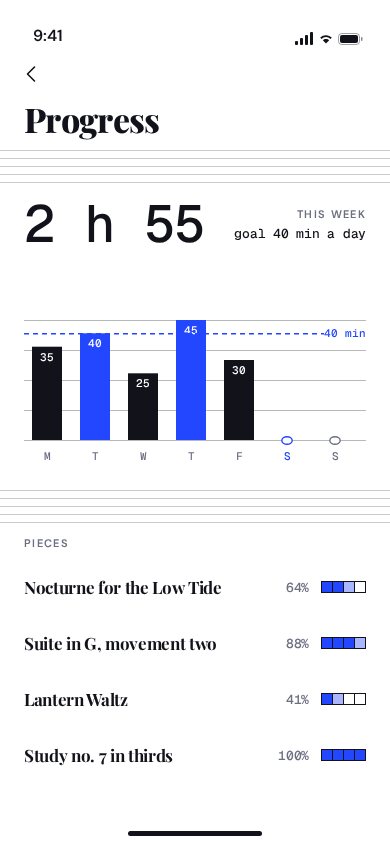
Quire is a complete sheet music and practice app: welcome, sign in, picking your instrument, a home with today's practice plan, a score library with search and composers, a piece page and a full page reader, a practice timer, a metronome and a tuner, set lists for recitals, progress per piece, a streak calendar, a Plus plan with checkout, notifications, profile and settings. Every stave, note and clef is drawn as SVG.
| Detail | Value |
|---|---|
| Screen type | Dashboard |
| App | Quire: Sheet music and practice |
| Category | Music |
| Design language | Minimal, light |
| Type | DM Sans |
| Colours | #ffffff background, #e9edff surface, #12131a text, #6b6f80 text-muted, #2346ff accent, #ffffff accent-contrast, #1632c4 secondary, #d9dbe6 border, #d8343f danger |
What this screen says
- Progress
- 2 h 55
- This weekgoal 40 min a day
- Pieces
- Nocturne for the Low Tide
- Suite in G, movement two
- Lantern Waltz
- Study no. 7 in thirds
Around it in Quire
More dashboard and stats screens
- Riff Insights: Upload and discover new tracks
- Groove Stats: Vinyl collection and crate digging
- Crossfade Stats: DJ mixing on the go
- Fork Stats: Tuner and metronome
- Belt Leaderboard: Karaoke nights
- Crowd Stats: Concert diary and setlists
- Dial Listening: Internet radio from everywhere
- Chorus Progress: Singing lessons and pitch training
- Verse Stats: Songwriting notebook
- Masters Earnings: Royalties and streams for artists
- Sonata Your season: Concert hall season and tickets
- Wax Listening stats: Music streaming
Every music app dashboard screen
What makes a good dashboard screen
- One headline number. The figure that matters most, like balance, steps or revenue, large at the top with its change since the last period.
- Give numbers context. Compared with last week, against a goal or as a trend line. A number alone does not say if it is good.
- Pick simple charts. Bars for comparing periods, lines for trends and rings for progress toward a goal. Avoid charts that need a legend to read.
- Let people change the period. Day, week, month and year as a segmented control above the chart.
The full dashboard screen guide and every example
Remix Quire free: describe your own app and it is drawn in this design. Or get its files from $10: Figma, React Native, SwiftUI, Flutter and HTML.