Templates · Detail screens · Food app · Queue
Queue Visit screen
A detail screen from Queue, a join the waitlist from anywhere app template in a Neubrutalism style. Screen 19 of 25.
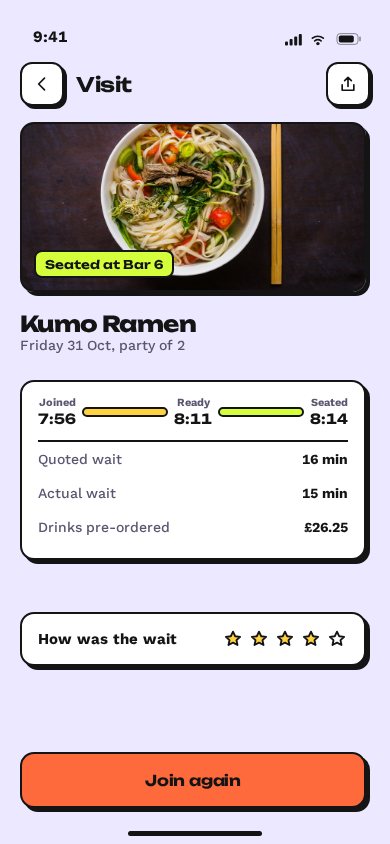
Queue is a complete restaurant waitlist app: welcome, phone sign in and code, a nearby home with your live place and short waits, a map of wait pins, search with wait and party filters, a restaurant page with busy hours, party size, review and a joined screen, a live place in line with a countdown ring, drinks to pre-order and pay for, running late or leave the line, a table ready hold timer, wait alerts, wait trends, visit history and a visit, favourites, a host view, a Plus plan, notifications, profile and settings. Lavender and white with ink outlines, tomato, lime, yellow and sky.
| Detail | Value |
|---|---|
| Screen type | Detail |
| App | Queue: Join the waitlist from anywhere |
| Category | Food |
| Design language | Neubrutalism, light |
| Type | Unbounded for headings, Work Sans for text |
| Colours | #ece8ff background, #ffffff surface, #141414 text, #5b5670 text-muted, #ff6a3d accent, #141414 accent-contrast, #d4ff3a secondary, #141414 border, #ffd23f warning, #7ad3ff info, #c43414 danger |
What this screen says
- Visit
- Seated at Bar 6
- Kumo Ramen
- Friday 31 Oct, party of 2
- Joined7:56
- Ready8:11
- Seated8:14
- Quoted wait 16 min
- Actual wait 15 min
- Drinks pre-ordered £26.25
- How was the wait
- Join again
Around it in Queue
More detail screens
- Tiffin Restaurant: Food delivery
- Courier Offer: Food delivery driver app
- Picker Batch offer: Grocery shopper app
- Nosh Restaurant: Local restaurant reviews
- Buns Item: Burger chain ordering and deals
- Slice Pizza: Pizza ordering with a live tracker
- Crate Recipe: Meal kits delivered weekly
- Dash Product: Ten minute grocery delivery
- Aisle Item: Shared grocery lists
- Menu Dish: Scan, order and pay at the table
- Mart Product: Supermarket app with loyalty and scan and go
- Rescue Bag: Surprise bags of surplus food
What makes a good detail screen
- Lead with what identifies the item. A large image or title, the price or status, and the key facts at the top. People should know they are in the right place at a glance.
- Keep the main action visible. A sticky bottom button for Add to cart, Book or Play stays reachable while people scroll through details.
- Order information by importance. The facts that decide the choice come first; reviews, specifications and fine print further down.
- Use progressive disclosure. Long descriptions, specifications and policies can expand on tap rather than filling the screen.
The full detail screen guide and every example
Remix Queue free: describe your own app and it is drawn in this design. Or get its files from $10: Figma, React Native, SwiftUI, Flutter and HTML.