Templates · Detail screens · Finance app · Prism
Prism Property screen
A detail screen from Prism, a finance app template in a Glass style. Screen 8 of 25.
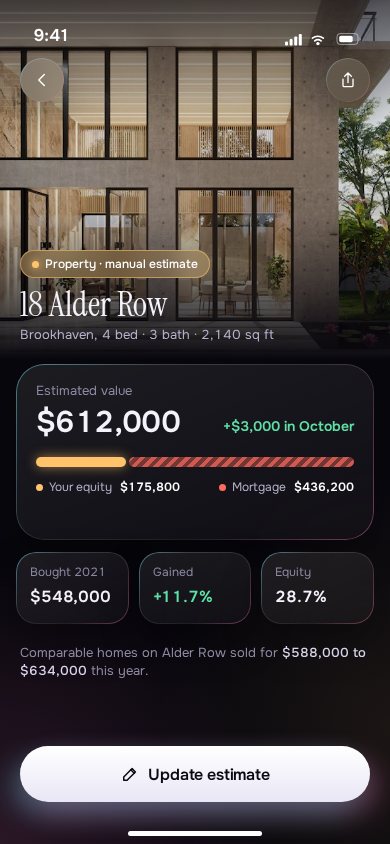
Prism is a complete net worth app: a prism welcome, picking institutions, sign in, a net worth home with a spectrum bar, accounts grouped by class, a brokerage account, a holding, a home with equity against its mortgage, debts with payoff bars, activity across every account, search, a twelve month trend with what moved it, an allocation ring, cash flow, adding and securely linking an account with a live sync and a success screen, a manual asset form, goals, a story style monthly recap, Prism Pro, notifications, profile and settings. Ink black and frosted glass split into amber, violet, mint, cyan and pink.
| Detail | Value |
|---|---|
| Screen type | Detail |
| App | Prism: Net worth across every account |
| Category | Finance |
| Design language | Glass, dark |
| Type | Instrument Serif for headings, Onest for text |
| Colours | #08070d background, #1a1824 surface, #f4f2fb text, #8d89a3 text-muted, #8f7dff accent, #0b0a12 accent-contrast, #6fe7ff secondary, #2a2638 border, #ff6b5e danger |
What this screen says
- Property · manual estimate
- 18 Alder Row
- Brookhaven, 4 bed · 3 bath · 2,140 sq ft
- Estimated value $612,000
- +$3,000 in October
- Your equity$175,800 Mortgage$436,200
- Bought 2021
- Gained
- Equity
- Comparable homes on Alder Row sold for $588,000 to $634,000 this year.
- Update estimate
Around it in Prism
More detail screens
- Storefront Order: Run your online store
- Bastion Checking: Everyday banking from a big bank
- Later Store: Buy now, pay in four
- Standing Card use: Credit score and reports
- Accrue Pot: Retirement and pension planner
- Levy Payment: Taxes for freelancers
- Bullion Gold: Gold and silver savings
- Wage Shift: Get paid as you work
- Keystone Loan: Mortgage and home loan tracker
- Rebate Card: Cashback card and rewards
- Aegis Auto policy: Insurance policies and claims
- Till Receipt: Card reader and sales for small shops
Every finance app detail screen
What makes a good detail screen
- Lead with what identifies the item. A large image or title, the price or status, and the key facts at the top. People should know they are in the right place at a glance.
- Keep the main action visible. A sticky bottom button for Add to cart, Book or Play stays reachable while people scroll through details.
- Order information by importance. The facts that decide the choice come first; reviews, specifications and fine print further down.
- Use progressive disclosure. Long descriptions, specifications and policies can expand on tap rather than filling the screen.
The full detail screen guide and every example
Remix Prism free: describe your own app and it is drawn in this design. Or get its files from $10: Figma, React Native, SwiftUI, Flutter and HTML.