Templates · Onboarding screens · Finance app · Prism
Prism Connect accounts screen
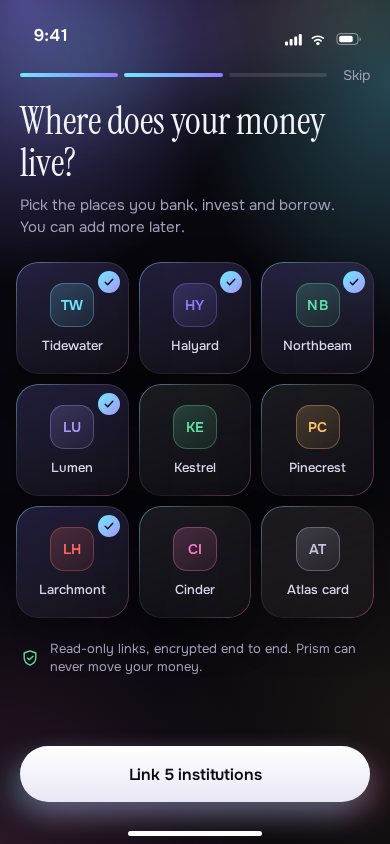
An onboarding screen from Prism, a finance app template in a Glass style. Screen 2 of 25.
Prism is a complete net worth app: a prism welcome, picking institutions, sign in, a net worth home with a spectrum bar, accounts grouped by class, a brokerage account, a holding, a home with equity against its mortgage, debts with payoff bars, activity across every account, search, a twelve month trend with what moved it, an allocation ring, cash flow, adding and securely linking an account with a live sync and a success screen, a manual asset form, goals, a story style monthly recap, Prism Pro, notifications, profile and settings. Ink black and frosted glass split into amber, violet, mint, cyan and pink.
| Detail | Value |
|---|---|
| Screen type | Onboarding |
| App | Prism: Net worth across every account |
| Category | Finance |
| Design language | Glass, dark |
| Type | Instrument Serif for headings, Onest for text |
| Colours | #08070d background, #1a1824 surface, #f4f2fb text, #8d89a3 text-muted, #8f7dff accent, #0b0a12 accent-contrast, #6fe7ff secondary, #2a2638 border, #ff6b5e danger |
What this screen says
- Skip
- Where does your money live?
- Pick the places you bank, invest and borrow. You can add more later.
- TWTidewater
- HYHalyard
- NBNorthbeam
- LULumen
- KEKestrel
- PCPinecrest
- LHLarchmont
- CICinder
- ATAtlas card
- Read-only links, encrypted end to end. Prism can never move your money.
- Link 5 institutions
Around it in Prism
More onboarding screens
- Claim Welcome: Expenses, filed like a till receipt
- Tally Welcome: Monthly budgeting
- Divvy Welcome: Split bills with friends
- Ticker Welcome: Stock investing
- Burrow Welcome: Shared savings pots
- Remit Welcome: International money transfer
- Piggy Welcome: Pocket money for kids
- Settle Welcome: Bill payments and banking
- Fathom Welcome: Crypto wallet
- Marigold Welcome: Mobile banking
- Zentra Welcome: Crypto trading
- Payday Welcome: Payroll for small teams
Every finance app onboarding screen
What makes a good onboarding screen
- One idea per screen. Each screen should say one thing in a headline people can read in a second. If a screen needs a paragraph, it is doing too much.
- Personalise with a purpose. Ask a question only if the answer changes what people see next, like a goal, a level or an interest. Then show that the answer mattered.
- Explain permissions before asking. Show your own screen saying why you need notifications, location or the camera before the system prompt. People who understand the reason are more likely to allow it.
- Let people skip. A visible skip or "I'll do this later" respects returning users and the impatient. Make sure skipping still lands them somewhere useful.
The full onboarding screen guide and every example
Remix Prism free: describe your own app and it is drawn in this design. Or get its files from $10: Figma, React Native, SwiftUI, Flutter and HTML.