Templates · Form and input screens · Lifestyle app · Postage
Postage Hold mail screen
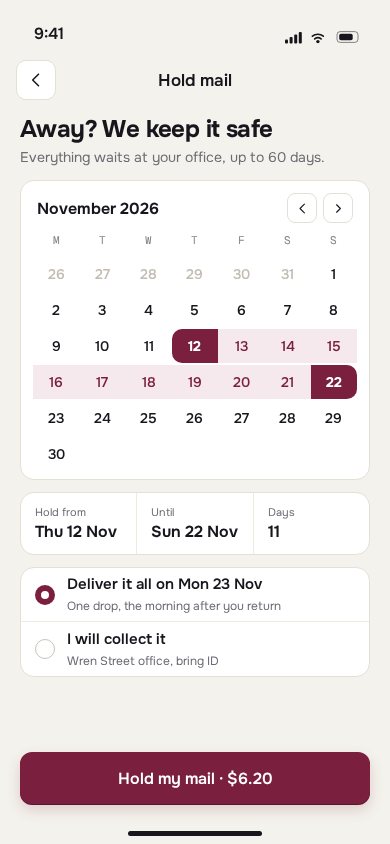
A form screen from Postage, a lifestyle app template in an Enterprise style. Screen 9 of 25.
Postage is a complete postal service app: welcome, sign in, address check, a home with today's delivery, a track list, an item timeline, a live van map, redelivery, hold mail and a barcode scanner, then a four step send flow (size and weight, destination, speed and price compare, pay) ending in a QR label. Offices and lockers on a map, a branch with hours, a locker drop code, stamps, a PO box, sending stats, alerts, a frequent sender plan, account and settings. Warm paper and white with claret, brass and a calm green for delivered.
| Detail | Value |
|---|---|
| Screen type | Form |
| App | Postage: Send parcels and find drop-off points |
| Category | Lifestyle |
| Design language | Enterprise, light |
| Type | Fraunces for headings, Onest for text |
| Colours | #f4f2ec background, #ffffff surface, #17161c text, #6d6a73 text-muted, #7a1f3d accent, #ffffff accent-contrast, #c8962e secondary, #e4e0d6 border, #1f7a52 success, #b4232f danger |
What this screen says
- Hold mail
- Away? We keep it safe
- Everything waits at your office, up to 60 days.
- November 2026
- Hold fromThu 12 Nov
- UntilSun 22 Nov
- Days11
- Deliver it all on Mon 23 NovOne drop, the morning after you return
- I will collect itWren Street office, bring ID
- Hold my mail · $6.20
Around it in Postage
More form and input screens
- Tasker Task details: Book and do local odd jobs
- Toolbox Calculator: Hardware store and project lists
- Brief Poll: News in sixty words
- Kibble Edit autoship: Pet supplies and autoship
- Filmlog Log film: Film diary and reviews
- Guardrail Daily limits: Parental controls and screen time
- Collar Edit zone: GPS pet tracker
- Specs Lenses: Glasses with virtual try-on
- Circuit Trade in: Electronics store with trade-in and repairs
- Provenance Make an offer: Authenticated luxury resale
- Gavel Max bid: Live online auctions
- Tidy Your home: Book home cleaners
Every lifestyle app form screen
What makes a good form screen
- Ask only what you need. Every field is a reason to stop. Remove optional fields or move them to later.
- Labels above fields. Visible labels stay readable while people type; placeholder-only labels disappear.
- Use the right keyboard and input. Number pads for amounts, email keyboards for email, pickers for dates and autofill for addresses and codes.
- Validate as people go. Show problems next to the field when people leave it, in words that say how to fix them.
The full form screen guide and every example
Remix Postage free: describe your own app and it is drawn in this design. Or get its files from $10: Figma, React Native, SwiftUI, Flutter and HTML.