Templates · List and feed screens · Sports app · Pitwall
Pitwall System logs screen
A list screen from Pitwall, a race engineering app template in a Dark-first style. Screen 15 of 24.
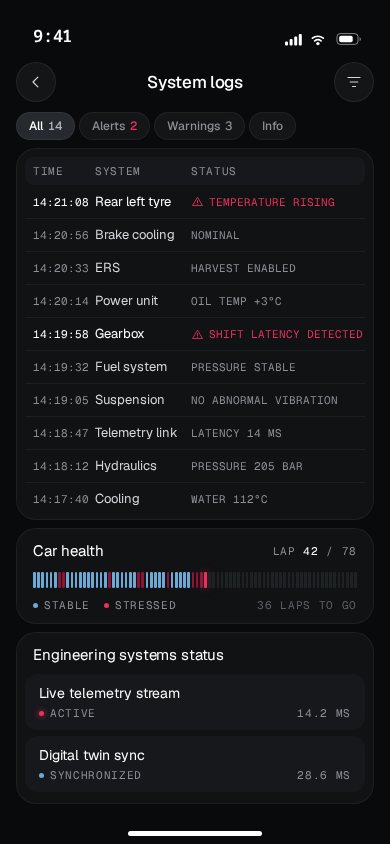
Pitwall is a complete race engineering app on carbon black: onboarding, sign in, a mission control home, a live track map, timing, driver and team radio, strategy and pit stops, a digital twin of the car with tyres, powertrain, brakes and telemetry, system logs and alerts, and a car development lab with simulations and design variables. Crimson for what matters, steel blue for reference data, mono labels throughout.
| Detail | Value |
|---|---|
| Screen type | List |
| App | Pitwall: Race engineering |
| Category | Sports |
| Design language | Dark-first, dark |
| Type | Geist Mono for headings, Geist for text |
| Colours | #080a0b background, #101214 surface, #ffffff text, #8b9096 text-muted, #c41f48 accent, #ffffff accent-contrast, #6ca9d4 secondary, #1d2023 border, #ff4d6d danger |
What this screen says
- System logs
- All 14 Alerts 2 Warnings 3 Info
- Time System Status
- 14:21:08 Rear left tyre Temperature rising
- 14:20:56 Brake cooling Nominal
- 14:20:33 ERS Harvest enabled
- 14:20:14 Power unit Oil temp +3°C
- 14:19:58 Gearbox Shift latency detected
- 14:19:32 Fuel system Pressure stable
- 14:19:05 Suspension No abnormal vibration
- 14:18:47 Telemetry link Latency 14 ms
- 14:18:12 Hydraulics Pressure 205 bar
- 14:17:40 Cooling Water 112°C
- Car health Lap 42 / 78
- Stable Stressed 36 laps to go
- Engineering systems status
- Live telemetry stream
- Active 14.2 ms
- Digital twin sync
- Synchronized 28.6 ms
Around it in Pitwall
More list and feed screens
- Bib Calendar: Find and enter races
- Wicket Commentary: Live cricket scores
- Courtside My runs: Pickup basketball games
- Tack Regattas: Sailing wind and regatta tracker
- Frag Schedule: Esports tournaments and teams
- Canter Instructors: Riding stables and lessons
- Ollie Clips: Skate spots and clips
- Eddy Rapids: River levels for paddlers
- Whistle Fixtures: Grassroots league manager for coaches
- Oche Practice: Darts scorer and leagues
- Cairn Trail list: Trails, contours and summits on one map sheet
- Lapse Drills: Swim training
What makes a good list screen
- Show what people need to decide. Each row should carry just enough to choose: a title, one or two details and a status. Everything else belongs on the detail screen.
- Keep rows consistent. The same information in the same place on every row lets people scan down a column instead of reading each item.
- Group with headings. Dates, categories or status headings break long lists into chunks people can skip through.
- Make common actions quick. Swipe actions, a checkbox or a heart on the row save opening the item for small tasks.
The full list screen guide and every example
Remix Pitwall free: describe your own app and it is drawn in this design. Or get its files from $10: Figma, React Native, SwiftUI, Flutter and HTML.