Templates · List and feed screens · Sports app · Piste
Piste Lessons screen
A list screen from Piste, a ski resort companion app template in a Glass style. Screen 21 of 25.
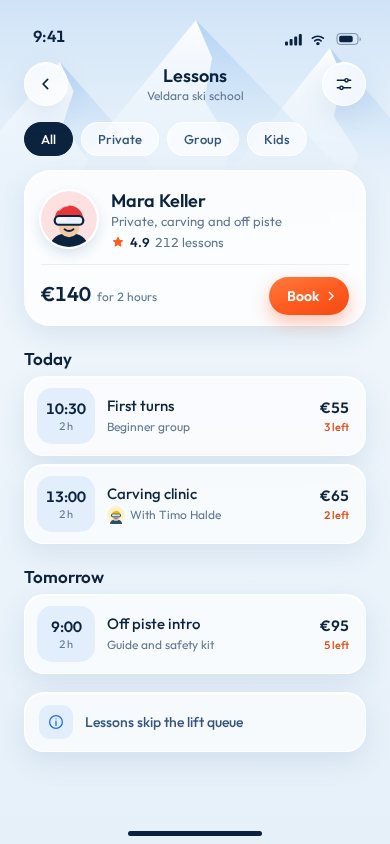
Piste is a complete ski resort app: welcome, sign in, choosing a resort, a home with today's conditions, the snow report and forecast, live lift status and a lift page, a drawn piste map, a run page with its elevation profile, a live run tracker, a day summary and season stats, friends on the mountain, the lift pass, buying a pass, lessons, rentals, notifications, profile and settings. Everything is drawn: faceted peaks, the piste map, lift icons and helmet avatars.
| Detail | Value |
|---|---|
| Screen type | List |
| App | Piste: Ski resort companion |
| Category | Sports |
| Design language | Glass, light |
| Type | Outfit |
| Colours | #eaf3fb background, #ffffff surface, #0c2340 text, #5f7691 text-muted, #ff5a1f accent, #ffffff accent-contrast, #1b6fe0 secondary, #d5e3f1 border, #e5383b danger |
What this screen says
- Lessons
- Veldara ski school
- All Private Group Kids
- Mara Keller
- Private, carving and off piste
- 4.9212 lessons
- €140for 2 hours
- Book
- Today
- 10:302 h
- First turns
- Beginner group
- €553 left
- 13:002 h
- Carving clinic
- With Timo Halde
- €652 left
- Tomorrow
- 9:002 h
- Off piste intro
- Guide and safety kit
- €955 left
- Lessons skip the lift queue
Around it in Piste
More list and feed screens
- Canter Instructors: Riding stables and lessons
- Ollie Clips: Skate spots and clips
- Eddy Rapids: River levels for paddlers
- Whistle Fixtures: Grassroots league manager for coaches
- Oche Practice: Darts scorer and leagues
- Cairn Trail list: Trails, contours and summits on one map sheet
- Lapse Drills: Swim training
- Angler Catch log: A fishing log drawn on the depth chart
- Crag Routes: Climbing gym logbook
- Fairway Notifications: Golf course guide and scorecard
- Matchday Notifications: Football scores and fantasy
- Rally Notifications: Tennis and padel club
What makes a good list screen
- Show what people need to decide. Each row should carry just enough to choose: a title, one or two details and a status. Everything else belongs on the detail screen.
- Keep rows consistent. The same information in the same place on every row lets people scan down a column instead of reading each item.
- Group with headings. Dates, categories or status headings break long lists into chunks people can skip through.
- Make common actions quick. Swipe actions, a checkbox or a heart on the row save opening the item for small tasks.
The full list screen guide and every example
Remix Piste free: describe your own app and it is drawn in this design. Or get its files from $10: Figma, React Native, SwiftUI, Flutter and HTML.