Templates · List and feed screens · Food app · Picker
Picker Schedule screen
A list screen from Picker, a grocery shopper app template in an Enterprise style. Screen 20 of 25.
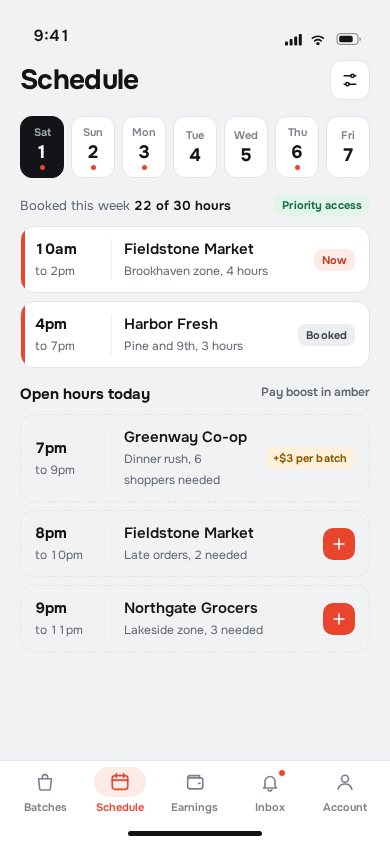
Picker is a complete shopper app for grocery delivery work: welcome, phone sign in and code, a batches home with live offers, a batch offer with route and pay, a shopping list grouped by aisle, item details, a barcode scanner, weighing produce, replacements and a chat with the customer, an order review, paying with the shopper card, snapping the receipt, live delivery on a map, drop off with a photo, batch complete, earnings, cash out, schedule, ratings, notifications, a priority plan, profile and settings. Ink, cool grey and white with tomato red and a found green.
| Detail | Value |
|---|---|
| Screen type | List |
| App | Picker: Grocery shopper app |
| Category | Food |
| Design language | Enterprise, light |
| Type | JetBrains Mono for headings, Onest for text |
| Colours | #f1f2f4 background, #ffffff surface, #121417 text, #5f6672 text-muted, #e8452c accent, #ffffff accent-contrast, #138a54 secondary, #e1e4e9 border, #d6331b danger |
What this screen says
- Schedule
- Sat 1
- Sun 2
- Mon 3
- Tue 4
- Wed 5
- Thu 6
- Fri 7
- Booked this week 22 of 30 hours Priority access
- 10amto 2pm
- Fieldstone Market
- Brookhaven zone, 4 hours
- Now
- 4pmto 7pm
- Harbor Fresh
- Pine and 9th, 3 hours
- Booked
- Open hours todayPay boost in amber
- 7pmto 9pm
- Greenway Co-op
- Dinner rush, 6 shoppers needed
- +$3 per batch
- 8pmto 10pm
- Late orders, 2 needed
- 9pmto 11pm
- Northgate Grocers
- Lakeside zone, 3 needed
- Batches
- Earnings
- Inbox
Around it in Picker
More list and feed screens
- Crumb Menu: Neighbourhood bakery
- Tiffin Restaurants: Food delivery
- Courier Deliveries: Food delivery driver app
- Queue Drinks: Join the waitlist from anywhere
- Nosh Menu: Local restaurant reviews
- Buns Deals: Burger chain ordering and deals
- Slice Menu: Pizza ordering with a live tracker
- Crate Menu: Meal kits delivered weekly
- Dash Aisle: Ten minute grocery delivery
- Aisle Weekly shop: Shared grocery lists
- Menu: Scan, order and pay at the table
- Mart Weekly ad: Supermarket app with loyalty and scan and go
What makes a good list screen
- Show what people need to decide. Each row should carry just enough to choose: a title, one or two details and a status. Everything else belongs on the detail screen.
- Keep rows consistent. The same information in the same place on every row lets people scan down a column instead of reading each item.
- Group with headings. Dates, categories or status headings break long lists into chunks people can skip through.
- Make common actions quick. Swipe actions, a checkbox or a heart on the row save opening the item for small tasks.
The full list screen guide and every example
Remix Picker free: describe your own app and it is drawn in this design. Or get its files from $10: Figma, React Native, SwiftUI, Flutter and HTML.