Templates · Detail screens · Travel app · Piazza
Piazza Stop screen
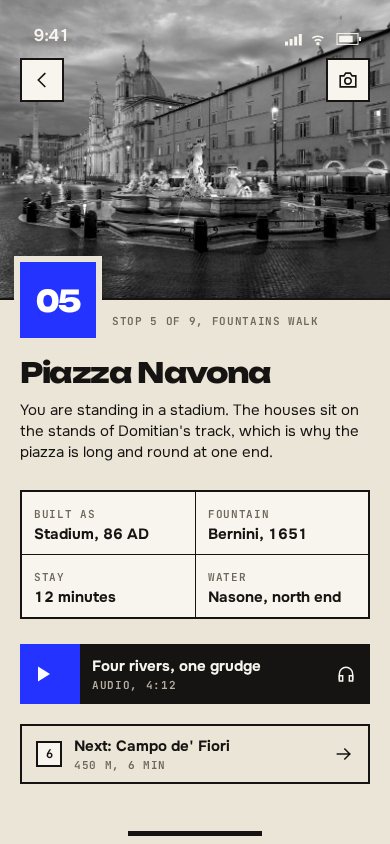
A detail screen from Piazza, a self-guided city walking tours app template in a Brutalist style. Screen 9 of 25.
Piazza is a complete walking tour app: welcome, choose a city, sign in, a today screen with the walk in progress, explore and search, tour lists and a tour page, the full route map, a stop page, buying a tour and unlocking it, live walking with turn by turn, the audio guide, a photo spot camera, a finished walk with a rating, a build your own walk planner, saved tours, a passport of piazza stamps, walking stats, offline maps, notifications, the Piazza Pass plan, profile and settings. Travertine, ink black and one ultramarine route line.
| Detail | Value |
|---|---|
| Screen type | Detail |
| App | Piazza: Self-guided city walking tours |
| Category | Travel |
| Design language | Brutalist, light |
| Type | Unbounded for headings, Onest for text |
| Colours | #ebe5d8 background, #f8f5ee surface, #161412 text, #6e675c text-muted, #2433ff accent, #ffffff accent-contrast, #d6cdbc secondary, #161412 border, #e0401f danger |
What this screen says
- Stop 5 of 9, Fountains walk
- Piazza Navona
- You are standing in a stadium. The houses sit on the stands of Domitian's track, which is why the piazza is long and...
- Built as Stadium, 86 AD
- Fountain Bernini, 1651
- Stay 12 minutes
- Water Nasone, north end
- Four rivers, one grudgeAudio, 4:12
- Next: Campo de' Fiori450 m, 6 min
Around it in Piazza
More detail screens
- Caravan Van: Campervan rental and road trips
- Layover Flight: Airport guide, gates and lounges
- Permit Passport: Visas and travel documents wallet
- Backroad Trip: Road trip planner with stops
- Bunk Hostel: Hostels and backpacker meetups
- Fjord Port day: Cruise companion on board
- Atlas Place: Maps and navigation
- Kerb Street bay: Parking that reads like a road sign
- Linea Departures: City transit
- Hollow Stay: Cabin and boutique stays
- Aloft Flight: Flight tracker
- Pitch Campsite: Campsite booking and trip kit
Every travel app detail screen
What makes a good detail screen
- Lead with what identifies the item. A large image or title, the price or status, and the key facts at the top. People should know they are in the right place at a glance.
- Keep the main action visible. A sticky bottom button for Add to cart, Book or Play stays reachable while people scroll through details.
- Order information by importance. The facts that decide the choice come first; reviews, specifications and fine print further down.
- Use progressive disclosure. Long descriptions, specifications and policies can expand on tap rather than filling the screen.
The full detail screen guide and every example
Remix Piazza free: describe your own app and it is drawn in this design. Or get its files from $10: Figma, React Native, SwiftUI, Flutter and HTML.