Templates · Search and explore screens · Travel app · Hail
Hail Where to screen
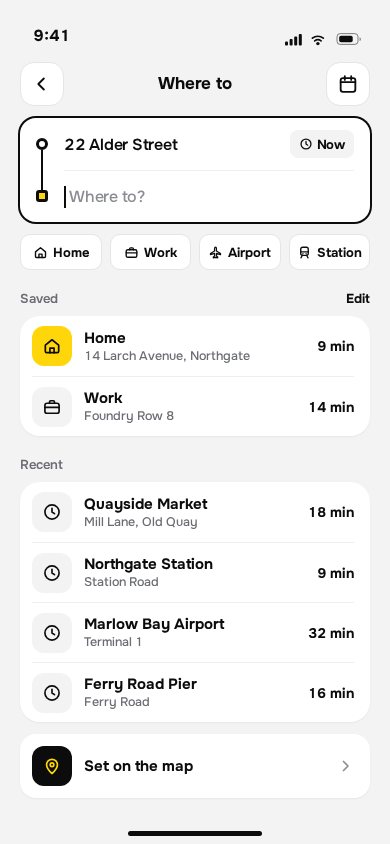
A search screen from Hail, a ride hailing app template in a Minimal style. Screen 5 of 25.
Hail is a complete ride hailing app: welcome, phone sign in and code, a map home with saved places, destination search, setting the pickup pin, choosing a ride, scheduling, matching, the driver on the way, messages, the trip itself, safety tools, arrival with rating and tip, the receipt, ride history, scheduled rides, saved places, a wallet with funds and cards, a pass, monthly stats, notifications, account and settings. One taxi yellow for whatever is selected, live or yours.
| Detail | Value |
|---|---|
| Screen type | Search |
| App | Hail: Ride hailing |
| Category | Travel |
| Design language | Minimal, light |
| Type | Onest |
| Colours | #f3f3f4 background, #ffffff surface, #0c0c0d text, #6b6d73 text-muted, #ffd60a accent, #0c0c0d accent-contrast, #e9eaec secondary, #e4e5e8 border, #e5484d danger |
What this screen says
- Where to
- 22 Alder Street Now
- Where to?
- Home Work Airport Station
- Saved Edit
- Home
- 14 Larch Avenue, Northgate
- 9 min
- Work
- Foundry Row 8
- 14 min
- Recent
- Quayside Market
- Mill Lane, Old Quay
- 18 min
- Northgate Station
- Station Road
- Marlow Bay Airport
- Terminal 1
- 32 min
- Ferry Road Pier
- Ferry Road
- 16 min
- Set on the map
Around it in Hail
More search and explore screens
- Bunk Search: Hostels and backpacker meetups
- Piazza Explore: Self-guided city walking tours
- Fjord Excursions: Cruise companion on board
- Atlas Explore nearby: Maps and navigation
- Kerb Search: Parking that reads like a road sign
- Linea Plan a journey: City transit
- Hollow Search: Cabin and boutique stays
- Aloft Add flight: Flight tracker
- Pitch Find campsites: Campsite booking and trip kit
- Volta Map: EV charging
- Museo Collection: Museum guide
- Roamly Explore: Trips, stays and experiences
Every travel app search screen
What makes a good search screen
- Show something before people type. Recent searches, popular items or categories make the empty search screen useful and save typing.
- Suggest as people type. Autocomplete with matching items, not only matching words, lets people jump straight to a result.
- Make filters visible and reversible. Show active filters as chips that can be removed in one tap, and the number of results as filters change.
- Forgive typos. Close matches and "Did you mean" stop a spelling mistake from ending in an empty screen.
The full search screen guide and every example
Remix Hail free: describe your own app and it is drawn in this design. Or get its files from $10: Figma, React Native, SwiftUI, Flutter and HTML.