Templates · List and feed screens · Finance app · Payday
Payday Team screen
A list screen from Payday, a payroll for small teams app template in an Enterprise style. Screen 12 of 25.
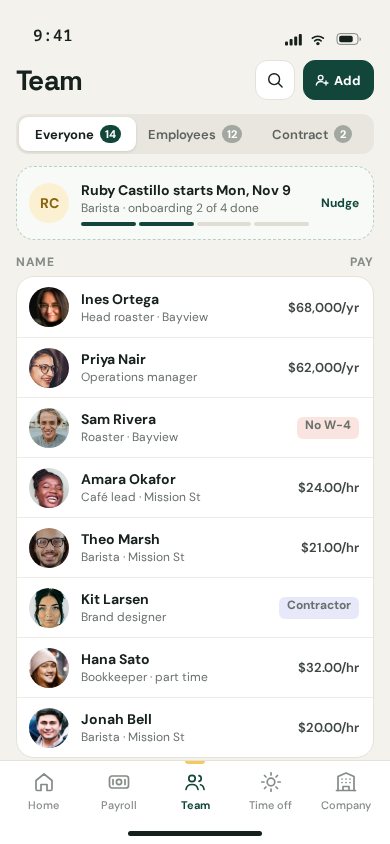
Payday is a complete payroll app for a small team: welcome, sign in and a code check, a company home with the next pay run, entering hours, a review with a cost breakdown, a slide to submit approval and a submitted timeline, pay run history and detail, a perforated pay stub, the team list, an employee record, adding an employee or contractor, time off requests with an approval view, benefits and a retirement plan, tax filings and a filed return, cost reports, plans, notifications, the company profile and settings. Warm paper and white with deep spruce, gold and cheque guilloche lines.
| Detail | Value |
|---|---|
| Screen type | List |
| App | Payday: Payroll for small teams |
| Category | Finance |
| Design language | Enterprise, light |
| Type | Space Grotesk for headings, DM Sans for text |
| Colours | #f3f2ec background, #ffffff surface, #16201c text, #6a716c text-muted, #12463a accent, #ffffff accent-contrast, #f4c95d secondary, #e4e2d9 border, #c8442f danger |
What this screen says
- Team
- Add
- Everyone 14
- Employees 12
- Contract 2
- RC
- Ruby Castillo starts Mon, Nov 9
- Barista · onboarding 2 of 4 done
- Nudge
- Name Pay
- Ines Ortega
- Head roaster · Bayview
- $68,000/yr
- Priya Nair
- Operations manager
- $62,000/yr
- Sam Rivera
- Roaster · Bayview
- No W-4
- Amara Okafor
- Café lead · Mission St
- $24.00/hr
- Theo Marsh
- Barista · Mission St
- $21.00/hr
- Kit Larsen
- Brand designer
- Contractor
- Hana Sato
- Bookkeeper · part time
Around it in Payday
More list and feed screens
- Compound Fund list: Mutual funds and SIPs
- Halden Transactions: Premium neobank
- Billable Today: Time tracking and invoices, kept like a ledger
- Lease Receipts: Your tenancy, drawn to plan
- Claim Expenses: Expenses, filed like a till receipt
- Tally Notifications: Monthly budgeting
- Divvy Notifications: Split bills with friends
- Ticker Movers: Stock investing
- Burrow Notifications: Shared savings pots
- Remit Notifications: International money transfer
- Piggy Chores: Pocket money for kids
- Settle Notifications: Bill payments and banking
What makes a good list screen
- Show what people need to decide. Each row should carry just enough to choose: a title, one or two details and a status. Everything else belongs on the detail screen.
- Keep rows consistent. The same information in the same place on every row lets people scan down a column instead of reading each item.
- Group with headings. Dates, categories or status headings break long lists into chunks people can skip through.
- Make common actions quick. Swipe actions, a checkbox or a heart on the row save opening the item for small tasks.
The full list screen guide and every example
Remix Payday free: describe your own app and it is drawn in this design. Or get its files from $10: Figma, React Native, SwiftUI, Flutter and HTML.