Templates · Form and input screens · Finance app · Payday
Payday Add person screen
A form screen from Payday, a payroll for small teams app template in an Enterprise style. Screen 14 of 25.
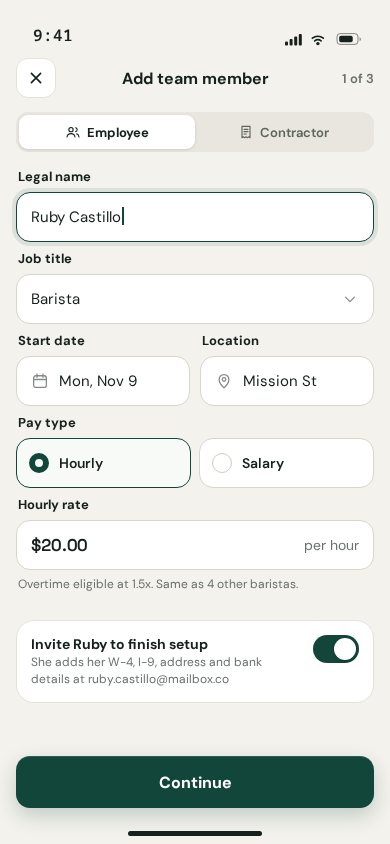
Payday is a complete payroll app for a small team: welcome, sign in and a code check, a company home with the next pay run, entering hours, a review with a cost breakdown, a slide to submit approval and a submitted timeline, pay run history and detail, a perforated pay stub, the team list, an employee record, adding an employee or contractor, time off requests with an approval view, benefits and a retirement plan, tax filings and a filed return, cost reports, plans, notifications, the company profile and settings. Warm paper and white with deep spruce, gold and cheque guilloche lines.
| Detail | Value |
|---|---|
| Screen type | Form |
| App | Payday: Payroll for small teams |
| Category | Finance |
| Design language | Enterprise, light |
| Type | Space Grotesk for headings, DM Sans for text |
| Colours | #f3f2ec background, #ffffff surface, #16201c text, #6a716c text-muted, #12463a accent, #ffffff accent-contrast, #f4c95d secondary, #e4e2d9 border, #c8442f danger |
What this screen says
- Add team member
- 1 of 3
- Employee
- Contractor
- Legal name
- Ruby Castillo
- Job title
- Barista
- Start date
- Mon, Nov 9
- Location
- Mission St
- Pay type
- Hourly
- Salary
- Hourly rate
- $20.00 per hour
- Overtime eligible at 1.5x. Same as 4 other baristas.
- Invite Ruby to finish setup
- She adds her W-4, I-9, address and bank details at ruby.castillo@mailbox.co
- Continue
Around it in Payday
More form and input screens
- Tally Edit budget: Monthly budgeting
- Divvy New group: Split bills with friends
- Ticker Order ticket: Stock investing
- Burrow New pot: Shared savings pots
- Remit Send money: International money transfer
- Piggy Add to jar: Pocket money for kids
- Settle Top up: Bill payments and banking
- Fathom Verify identity: Crypto wallet
- Marigold Verify identity: Mobile banking
- Zentra Swap: Crypto trading
- Roundup Pick a mix: Invest your spare change
- Envelope Assign: Give every dollar a job
What makes a good form screen
- Ask only what you need. Every field is a reason to stop. Remove optional fields or move them to later.
- Labels above fields. Visible labels stay readable while people type; placeholder-only labels disappear.
- Use the right keyboard and input. Number pads for amounts, email keyboards for email, pickers for dates and autofill for addresses and codes.
- Validate as people go. Show problems next to the field when people leave it, in words that say how to fix them.
The full form screen guide and every example
Remix Payday free: describe your own app and it is drawn in this design. Or get its files from $10: Figma, React Native, SwiftUI, Flutter and HTML.