Templates · Form and input screens · Productivity app · Parley
Parley New poll screen
A form screen from Parley, a team messenger app template in a Dark-first style. Screen 16 of 25.
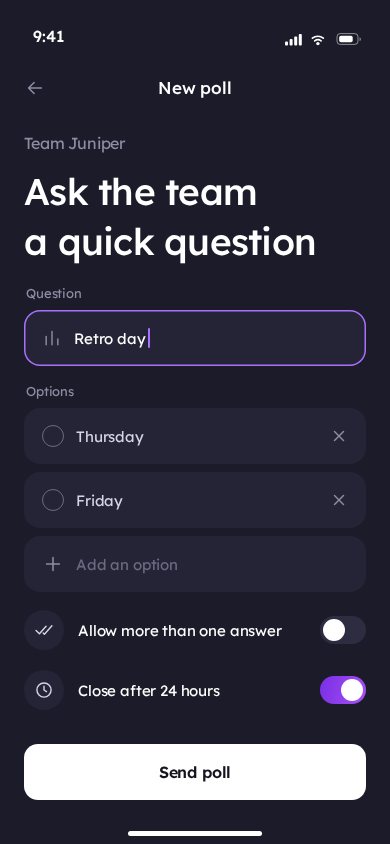
Parley is a complete team messenger: welcome, sign in and a code, a home with a status row and direct and team chats, search, statuses, a one to one chat with voice notes, a team chat with a poll and a shared task, creating a group with an admin and invited members, group info, channels, shared tasks, polls, calls, a video meeting, a weekly team pulse, contacts, profile, notifications, a plan and settings. Dark indigo charcoal with one violet and portraits on flat coloured circles.
| Detail | Value |
|---|---|
| Screen type | Form |
| App | Parley: Team messenger |
| Category | Productivity |
| Design language | Dark-first, dark |
| Type | Lexend |
| Colours | #1c1b29 background, #252437 surface, #ffffff text, #8d8ca3 text-muted, #8b3df0 accent, #ffffff accent-contrast, #f6c443 secondary, #34334a border, #f0464f danger |
What this screen says
- New poll
- Team Juniper
- Ask the team
- a quick question
- Question
- Retro day
- Options
- Thursday
- Friday
- Add an option
- Allow more than one answer
- Close after 24 hours
- Send poll
Around it in Parley
More form and input screens
- Jot Format: Quick notes and checklists
- Chrono Planner: World clock, timers and stopwatch
- Frontdesk Reply: Customer support inbox
- Campaign New campaign: Email marketing campaigns
- Outpost Compose: Schedule social posts
- Pageview Compare: Website analytics
- Polish Rewrite: Writing assistant and keyboard
- Tapline Add link: Link-in-bio pages and analytics
- Quill Insert block: Docs, wikis and databases in one workspace
- Tandem Compose: Team chat, channels and huddles
- Shipyard Comments: Issue tracking for product teams
- Canvas New comment: Design files and comments on mobile
Every productivity app form screen
What makes a good form screen
- Ask only what you need. Every field is a reason to stop. Remove optional fields or move them to later.
- Labels above fields. Visible labels stay readable while people type; placeholder-only labels disappear.
- Use the right keyboard and input. Number pads for amounts, email keyboards for email, pickers for dates and autofill for addresses and codes.
- Validate as people go. Show problems next to the field when people leave it, in words that say how to fix them.
The full form screen guide and every example
Remix Parley free: describe your own app and it is drawn in this design. Or get its files from $10: Figma, React Native, SwiftUI, Flutter and HTML.