Templates · Detail screens · Productivity app · Parchment
Parchment Suggestions screen
A detail screen from Parchment, a productivity app template in a Minimal style. Screen 10 of 25.
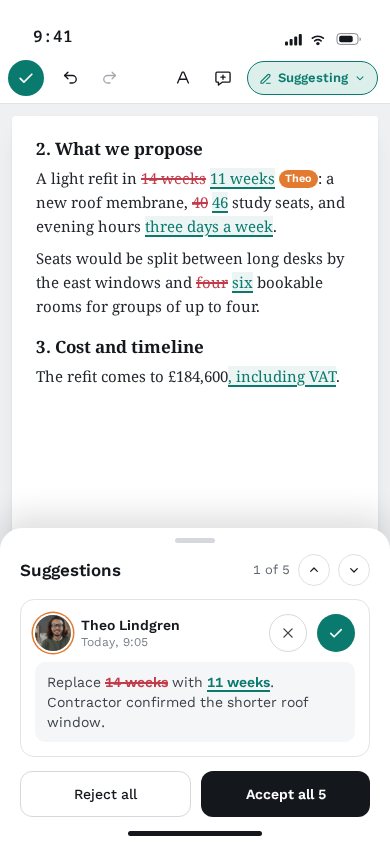
Parchment is a complete documents app: welcome, sign in, a home with new document starters and a grid of recent pages, search, files and shared with me, a document page, live editing with a formatting bar and keyboard, text style, suggestion mode with tracked changes, comments and a reply thread, the outline, share with roles, link access and an invite sent screen, version history and an old version to restore, templates, document activity, offline files, notifications, a Pro plan, profile and settings. Fog grey and paper white with ink, verdigris and a highlighter yellow.
| Detail | Value |
|---|---|
| Screen type | Detail |
| App | Parchment: Documents, edit and share |
| Category | Productivity |
| Design language | Minimal, light |
| Type | Iowan Old Style for headings, Work Sans for text |
| Colours | #eef0f2 background, #ffffff surface, #14171c text, #687079 text-muted, #0b7a6e accent, #ffffff accent-contrast, #ffe27a secondary, #e0e3e7 border, #c23b4a danger |
What this screen says
- Suggesting
- 2. What we propose
- A light refit in 14 weeks 11 weeks Theo : a new roof membrane, 40 46 study seats, and evening hours three days a week .
- Seats would be split between long desks by the east windows and four six bookable rooms for groups of up to four.
- 3. Cost and timeline
- The refit comes to £184,600, including VAT .
- Suggestions
- 1 of 5
- Theo Lindgren
- Today, 9:05
- Replace 14 weeks with 11 weeks. Contractor confirmed the shorter roof window.
- Reject all
- Accept all 5
Around it in Parchment
More detail screens
- Polish Suggestion: Writing assistant and keyboard
- Tapline Link: Link-in-bio pages and analytics
- Quill Doc: Docs, wikis and databases in one workspace
- Tandem Channel: Team chat, channels and huddles
- Shipyard Issue: Issue tracking for product teams
- Canvas File: Design files and comments on mobile
- Merge Repository: Code, pull requests and reviews
- Query Answer: AI answers with sources
- Glossa Translation: Translate text, voice and camera
- Layout Template: Design anything from templates
- Tick Task: To-do lists and reminders
- Beacon Person: Find your devices and people
Every productivity app detail screen
What makes a good detail screen
- Lead with what identifies the item. A large image or title, the price or status, and the key facts at the top. People should know they are in the right place at a glance.
- Keep the main action visible. A sticky bottom button for Add to cart, Book or Play stays reachable while people scroll through details.
- Order information by importance. The facts that decide the choice come first; reviews, specifications and fine print further down.
- Use progressive disclosure. Long descriptions, specifications and policies can expand on tap rather than filling the screen.
The full detail screen guide and every example
Remix Parchment free: describe your own app and it is drawn in this design. Or get its files from $10: Figma, React Native, SwiftUI, Flutter and HTML.