Templates · List and feed screens · Food app · Pantry
Pantry Offers screen
A list screen from Pantry, a grocery delivery app template in a Playful style. Screen 20 of 25.
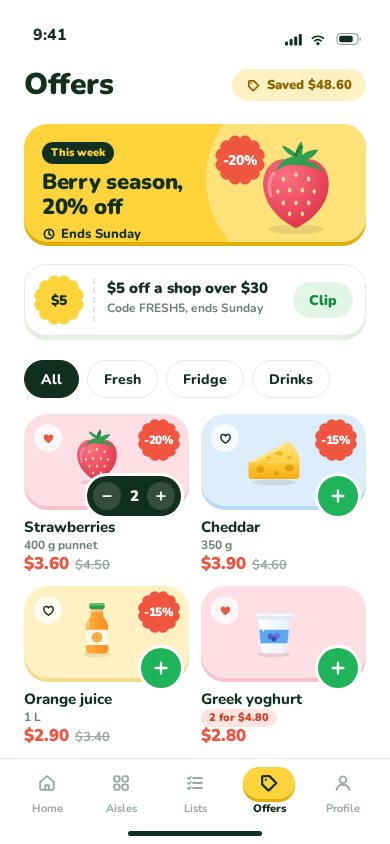
Pantry is a complete grocery delivery app: welcome, sign in and a code check, a delivery address, a home with offers, aisles and buy it again, aisle browsing and search, a product page, the cart, delivery slots, substitutions and checkout, an order placed screen, live tracking on a drawn map, orders and a receipt, shopping lists, offers, a wallet with a spend dashboard, a membership plan, notifications, profile and settings. White with fresh green and sunny yellow, and every product is a drawn illustration on a pastel tile.
| Detail | Value |
|---|---|
| Screen type | List |
| App | Pantry: Grocery delivery |
| Category | Food |
| Design language | Playful, light |
| Type | Nunito |
| Colours | #ffffff background, #f4f9f2 surface, #12301f text, #6c7f72 text-muted, #1fb35a accent, #ffffff accent-contrast, #ffd43b secondary, #e4ede2 border, #f0553f danger |
What this screen says
- Offers
- Saved $48.60
- This week
- Berry season,
- 20% off
- Ends Sunday
- $5 off a shop over $30
- Code FRESH5, ends Sunday
- Clip
- All Fresh Fridge Drinks
- Strawberries
- 400 g punnet
- Cheddar
- 350 g
- Orange juice
- 1 L
- Greek yoghurt
- 2 for $4.80
- Home
- Aisles
- Lists
- Profile
Around it in Pantry
More list and feed screens
- Brewly Menu: Coffee ordering and loyalty
- Tabla Reviews: Tables worth dressing for
- Corked Notifications: Wine journal and cellar
- Crumb Menu: Neighbourhood bakery
- Tiffin Restaurants: Food delivery
- Courier Deliveries: Food delivery driver app
- Picker Shop list: Grocery shopper app
- Queue Drinks: Join the waitlist from anywhere
- Nosh Menu: Local restaurant reviews
- Buns Deals: Burger chain ordering and deals
- Slice Menu: Pizza ordering with a live tracker
- Crate Menu: Meal kits delivered weekly
What makes a good list screen
- Show what people need to decide. Each row should carry just enough to choose: a title, one or two details and a status. Everything else belongs on the detail screen.
- Keep rows consistent. The same information in the same place on every row lets people scan down a column instead of reading each item.
- Group with headings. Dates, categories or status headings break long lists into chunks people can skip through.
- Make common actions quick. Swipe actions, a checkbox or a heart on the row save opening the item for small tasks.
The full list screen guide and every example
Remix Pantry free: describe your own app and it is drawn in this design. Or get its files from $10: Figma, React Native, SwiftUI, Flutter and HTML.