Templates · Detail screens · Education app · Palm
Palm Tutor screen
A detail screen from Palm, a learn sign language app template in a Playful style. Screen 18 of 25.
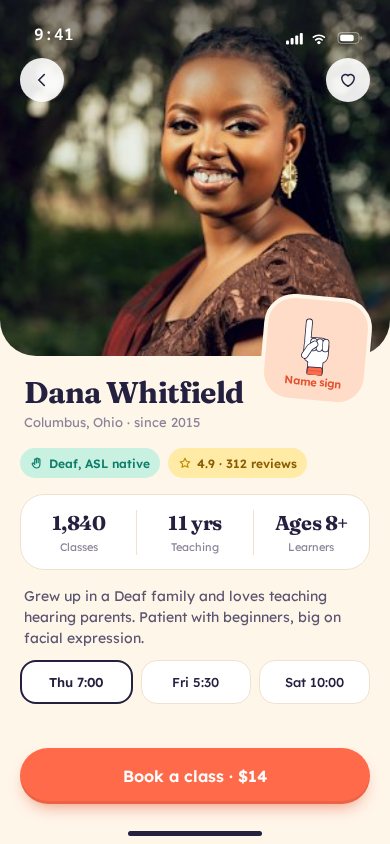
Palm is a complete sign language course: welcome, a learning goal, sign up, a home with today's lesson and the sign of the day, the course and a unit, a slow motion video lesson, a sign broken into handshape, location and movement, camera practice with live hand feedback, a quiz, fingerspelling and the alphabet, a lesson done screen, the sign dictionary, saved signs, progress, live classes with Deaf tutors, booking and a confirmation, a culture read, a Plus plan, notifications, profile and settings. Cream and white with coral, sunflower and pastel pebbles.
| Detail | Value |
|---|---|
| Screen type | Detail |
| App | Palm: Learn sign language |
| Category | Education |
| Design language | Playful, light |
| Type | Fraunces for headings, Lexend for text |
| Colours | #fff6ea background, #ffffff surface, #24203f text, #8a8399 text-muted, #ff6b4a accent, #ffffff accent-contrast, #ffc94a secondary, #f0e2cf border, #e2502f danger |
What this screen says
- Name sign
- Dana Whitfield
- Columbus, Ohio · since 2015
- Deaf, ASL native 4.9 · 312 reviews
- 1,840Classes
- 11 yrsTeaching
- Ages 8+Learners
- Grew up in a Deaf family and loves teaching hearing parents. Patient with beginners, big on facial expression.
- Thu 7:00
- Fri 5:30
- Sat 10:00
- Book a class · $14
Around it in Palm
More detail screens
- Recall Deck: Flashcards and spaced repetition
- Numo Daily challenge: Kids maths game
- Syntax Python basics: Learn to code
- Tuckin Story: Bedtime stories for kids
- Zenith Saturn: Night sky guide
- Chalk Course: Design courses
- Encore Course: Creator courses
- Classroom Stream: Class stream and assignments
- Studyhall Course: Free lessons and practice for school
- Tutor profile: Book online tutors for any skill
- Leaf Dictionary: E-books and reading
- Almanac Article: The free encyclopedia reader
Every education app detail screen
What makes a good detail screen
- Lead with what identifies the item. A large image or title, the price or status, and the key facts at the top. People should know they are in the right place at a glance.
- Keep the main action visible. A sticky bottom button for Add to cart, Book or Play stays reachable while people scroll through details.
- Order information by importance. The facts that decide the choice come first; reviews, specifications and fine print further down.
- Use progressive disclosure. Long descriptions, specifications and policies can expand on tap rather than filling the screen.
The full detail screen guide and every example
Remix Palm free: describe your own app and it is drawn in this design. Or get its files from $10: Figma, React Native, SwiftUI, Flutter and HTML.