Templates · List and feed screens · Productivity app · Outpost
Outpost Approvals screen
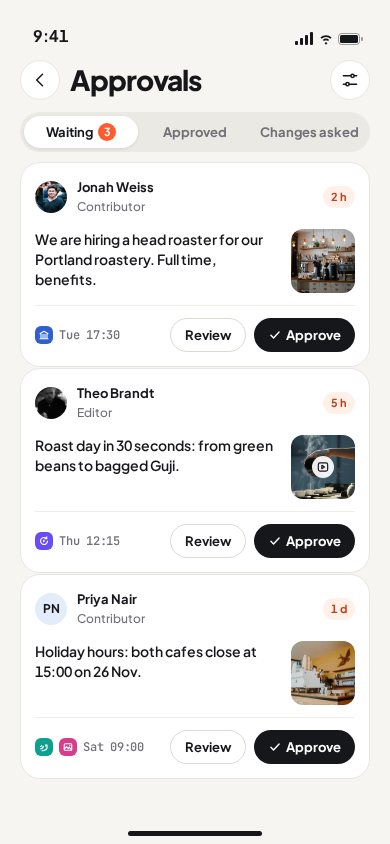
A list screen from Outpost, a schedule social posts app template in a Minimal style. Screen 19 of 25.
Outpost is a complete social scheduling app for a small team: welcome, channel connecting, sign in, a queue of time slots, compose with per-channel previews, image cropping, scheduling with best times and a confirmation, a month calendar, post details, an ideas board, posting times, analytics and post stats, a channel page, an engagement inbox and replies, team approvals and review, search, notifications, a Pro plan, profile and settings. Paper white and ink with a signal orange accent and a colour per channel.
| Detail | Value |
|---|---|
| Screen type | List |
| App | Outpost: Schedule social posts |
| Category | Productivity |
| Design language | Minimal, light |
| Type | JetBrains Mono for headings, Plus Jakarta Sans for text |
| Colours | #f6f5f1 background, #ffffff surface, #16171b text, #6f7078 text-muted, #ff5b2e accent, #fff0ea accent-soft, #e8e6e0 border, #1f9d63 success, #0e9f8e channel-1, #d63e8a channel-2, #2f5fd0 channel-3, #6a4cf5 channel-4, #5f8f2e channel-5 |
What this screen says
- Approvals
- Waiting 3 Approved Changes asked
- Jonah WeissContributor
- 2 h
- We are hiring a head roaster for our Portland roastery. Full time, benefits.
- Tue 17:30 Review Approve
- Theo BrandtEditor
- 5 h
- Roast day in 30 seconds: from green beans to bagged Guji.
- Thu 12:15 Review Approve
- PN
- Priya NairContributor
- 1 d
- Holiday hours: both cafes close at 15:00 on 26 Nov.
- Sat 09:00 Review Approve
Around it in Outpost
More list and feed screens
- Pomo Notifications: Focus timer
- Postbox Swipe actions: Email for busy teams
- Daybook Day: Calendar and planner
- Scanly Notifications: Document scanner
- Keyring Logins: Password manager
- Rota Notifications: Shift scheduling for hourly teams
- Inkwell Prompts: Daily journal
- Shortlist Notifications: Job search and application tracker
- Parley Add members: Team messenger
- Docket Notifications: Task and sprint planner
- Kanso Notifications: Tasks, calendar and chat
- Margin Notebooks: AI note taking
Every productivity app list screen
What makes a good list screen
- Show what people need to decide. Each row should carry just enough to choose: a title, one or two details and a status. Everything else belongs on the detail screen.
- Keep rows consistent. The same information in the same place on every row lets people scan down a column instead of reading each item.
- Group with headings. Dates, categories or status headings break long lists into chunks people can skip through.
- Make common actions quick. Swipe actions, a checkbox or a heart on the row save opening the item for small tasks.
The full list screen guide and every example
Remix Outpost free: describe your own app and it is drawn in this design. Or get its files from $10: Figma, React Native, SwiftUI, Flutter and HTML.