Templates · List and feed screens · Food app · Omakase
Omakase Saved screen
A list screen from Omakase, a chef's counter reservations app template in a Luxury style. Screen 21 of 25.
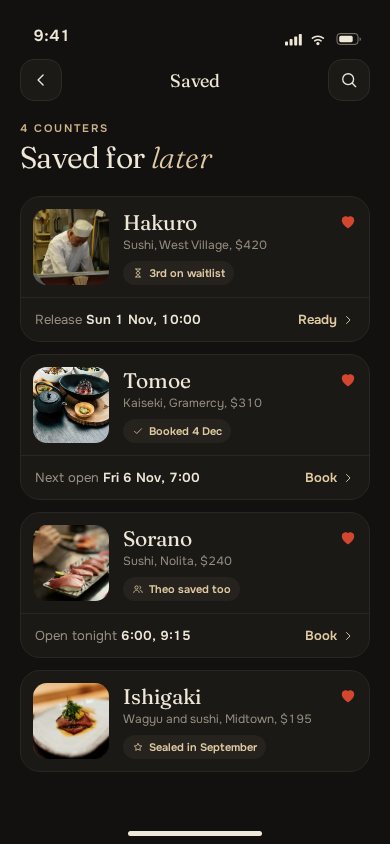
Omakase is a complete chef's counter booking app: welcome, your palate and allergies, sign in, a home with your next seat and the next seat drop, discover, a counter page, the chef, tonight's courses, a seat picker on a drawn hinoki counter, date and seating, guests and notes, review and pay, a sealed confirmation, reservations, a reservation ticket, waitlist alerts, a live course tracker at the counter, a tasting journal and notes, a passport of seals and stats, saved counters, a Reserve membership, notifications, profile and settings. Sumi ink and hinoki wood with one vermilion accent.
| Detail | Value |
|---|---|
| Screen type | List |
| App | Omakase: Chef's counter reservations |
| Category | Food |
| Design language | Luxury, dark |
| Type | Fraunces for headings, Onest for text |
| Colours | #12110f background, #1b1916 surface, #efe7d8 text, #968d7f text-muted, #d4472f accent, #fff4ea accent-contrast, #e2cba3 secondary, #2a2722 border, #e0604a danger |
What this screen says
- Saved
- 4 counters
- Saved for later
- Hakuro
- Sushi, West Village, $420
- 3rd on waitlist
- Release Sun 1 Nov, 10:00 Ready
- Tomoe
- Kaiseki, Gramercy, $310
- Booked 4 Dec
- Next open Fri 6 Nov, 7:00 Book
- Sorano
- Sushi, Nolita, $240
- Theo saved too
- Open tonight 6:00, 9:15 Book
- Ishigaki
- Wagyu and sushi, Midtown, $195
- Sealed in September
Around it in Omakase
More list and feed screens
- Ladle Week plan: Recipes and meal planning
- Pantry Fruit and veg: Grocery delivery
- Brewly Menu: Coffee ordering and loyalty
- Tabla Reviews: Tables worth dressing for
- Corked Notifications: Wine journal and cellar
- Crumb Menu: Neighbourhood bakery
- Tiffin Restaurants: Food delivery
- Courier Deliveries: Food delivery driver app
- Picker Shop list: Grocery shopper app
- Queue Drinks: Join the waitlist from anywhere
- Nosh Menu: Local restaurant reviews
- Buns Deals: Burger chain ordering and deals
What makes a good list screen
- Show what people need to decide. Each row should carry just enough to choose: a title, one or two details and a status. Everything else belongs on the detail screen.
- Keep rows consistent. The same information in the same place on every row lets people scan down a column instead of reading each item.
- Group with headings. Dates, categories or status headings break long lists into chunks people can skip through.
- Make common actions quick. Swipe actions, a checkbox or a heart on the row save opening the item for small tasks.
The full list screen guide and every example
Remix Omakase free: describe your own app and it is drawn in this design. Or get its files from $10: Figma, React Native, SwiftUI, Flutter and HTML.