Templates · Dashboard and stats screens · Smart home app · Nursery
Nursery Last night screen
A dashboard screen from Nursery, a baby monitor camera and sleep app template in a Glass style. Screen 12 of 25.
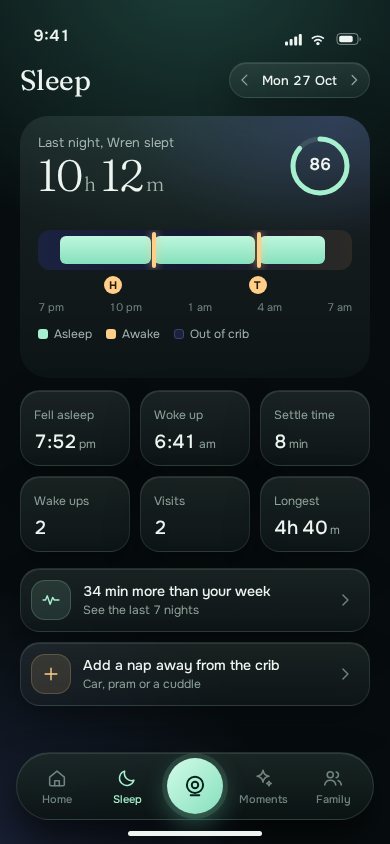
Nursery is a complete baby monitor and sleep app: welcome, pairing the camera, sign in, a home with the live crib view, breathing and the room, a full screen night vision live view with talk back and lullabies, a live breathing band, room temperature and humidity, the night's events and clips, last night's sleep band, weekly trends, a sleep log, auto saved moments, a sleep coach, alert settings, notifications, caregivers with an invite flow, a Plus plan with checkout, the baby's profile and settings. Midnight moss glass with mint, honey and lavender.
| Detail | Value |
|---|---|
| Screen type | Dashboard |
| App | Nursery: Baby monitor camera and sleep |
| Category | Smart home |
| Design language | Glass, dark |
| Type | Fraunces for headings, Onest for text |
| Colours | #070d0f background, #13201f surface (glass: white at 3.5 to 9.5% over the page), #eef5f1 text, #8fa39b text-muted, #a6f0cf accent, #06201a accent-contrast, #ffcf8a secondary, #bdb7ff tertiary, #ff9d8c danger |
What this screen says
- Sleep
- Mon 27 Oct
- Last night, Wren slept
- 10h12m
- H T
- 7 pm 10 pm 1 am 4 am 7 am
- Asleep Awake Out of crib
- Fell asleep
- 7:52pm
- Woke up
- 6:41am
- Settle time
- 8min
- Wake ups
- Visits
- Longest
- 4h 40m
- 34 min more than your week
- See the last 7 nights
- Add a nap away from the crib
- Car, pram or a cuddle
- Home
- Moments
- Family
Around it in Nursery
More dashboard and stats screens
- Tagged Coverage: Home inventory for insurance
- Lobby Building status: Apartment building app
- Sweep Stats: Robot vacuum and mop
- Dusk Security: Smart home scenarios
- Lumen Energy: Smart home energy
- Abode Energy: Smart home devices
- Boxed Packing progress: Book movers and plan moving day
- Meter Usage: Your energy supplier account
- Couch Your week: TV remote, casting and watchlist
- Chime Activity: Voice assistant and smart speaker
- Latch Insights: Smart locks and guest access
- Mesh Topology: Home Wi-Fi network
Every smart home app dashboard screen
What makes a good dashboard screen
- One headline number. The figure that matters most, like balance, steps or revenue, large at the top with its change since the last period.
- Give numbers context. Compared with last week, against a goal or as a trend line. A number alone does not say if it is good.
- Pick simple charts. Bars for comparing periods, lines for trends and rings for progress toward a goal. Avoid charts that need a legend to read.
- Let people change the period. Day, week, month and year as a segmented control above the chart.
The full dashboard screen guide and every example
Remix Nursery free: describe your own app and it is drawn in this design. Or get its files from $10: Figma, React Native, SwiftUI, Flutter and HTML.