Templates · Dashboard and stats screens · Smart home app · Latch
Latch Insights screen
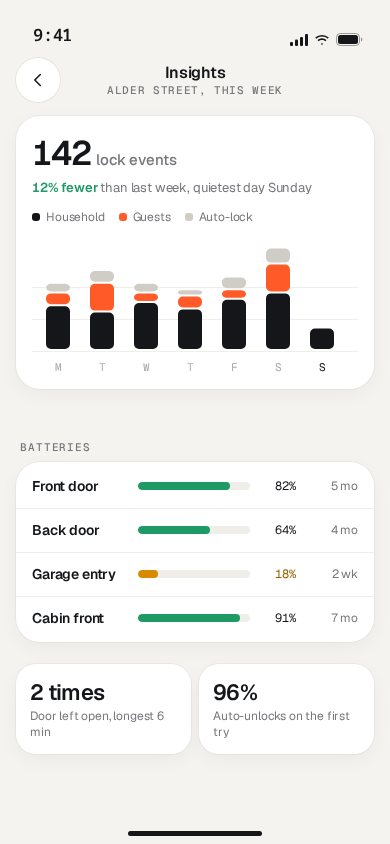
A dashboard screen from Latch, a smart locks and guest access app template in a Minimal style. Screen 19 of 25.
Latch is a complete smart lock app: welcome, sign in, a home with a big lock dial, door details, a live auto-lock countdown, every door across two homes, a door activity log with entry details, guest keys with schedules, an access window picker, review and a sent key, keypad codes with a number pad, auto-lock and auto-unlock, lock health insights, adding and calibrating a lock, a plan, notifications, account and settings. Porcelain and white with ink, one vermilion for unlocked and a calm green for locked.
| Detail | Value |
|---|---|
| Screen type | Dashboard |
| App | Latch: Smart locks and guest access |
| Category | Smart home |
| Design language | Minimal, light |
| Type | Geist Mono for headings, Geist for text |
| Colours | #f4f3ef background, #ffffff surface, #141619 text, #76777b text-muted, #ff5a28 accent, #ffebe3 accent-soft, #1d9a66 success, #d98a00 warning, #e7e5df border |
What this screen says
- InsightsAlder Street, this week
- 142 lock events
- 12% fewer than last week, quietest day Sunday
- Household Guests Auto-lock
- Batteries
- Front door
- 82% 5 mo
- Back door
- 64% 4 mo
- Garage entry
- 18% 2 wk
- Cabin front
- 91% 7 mo
- 2 times
- Door left open, longest 6 min
- Auto-unlocks on the first try
Around it in Latch
More dashboard and stats screens
- Porch Insights: Home security cameras
- Sundial Forecast: Solar panels and home battery
- Puddle Weather: Garden watering and sprinklers
- Upkeep Costs: Home maintenance calendar
- Kelvin Air quality: Climate and thermostat
- Glow Insights: Light scenes and colour
- Tagged Coverage: Home inventory for insurance
- Lobby Building status: Apartment building app
- Sweep Stats: Robot vacuum and mop
- Dusk Security: Smart home scenarios
- Lumen Energy: Smart home energy
- Abode Energy: Smart home devices
Every smart home app dashboard screen
What makes a good dashboard screen
- One headline number. The figure that matters most, like balance, steps or revenue, large at the top with its change since the last period.
- Give numbers context. Compared with last week, against a goal or as a trend line. A number alone does not say if it is good.
- Pick simple charts. Bars for comparing periods, lines for trends and rings for progress toward a goal. Avoid charts that need a legend to read.
- Let people change the period. Day, week, month and year as a segmented control above the chart.
The full dashboard screen guide and every example
Remix Latch free: describe your own app and it is drawn in this design. Or get its files from $10: Figma, React Native, SwiftUI, Flutter and HTML.