Templates · Dashboard and stats screens · Fitness app · Nightly
Nightly Trends screen
A dashboard screen from Nightly, a smart ring sleep and readiness app template in a Dark-first style. Screen 15 of 25.
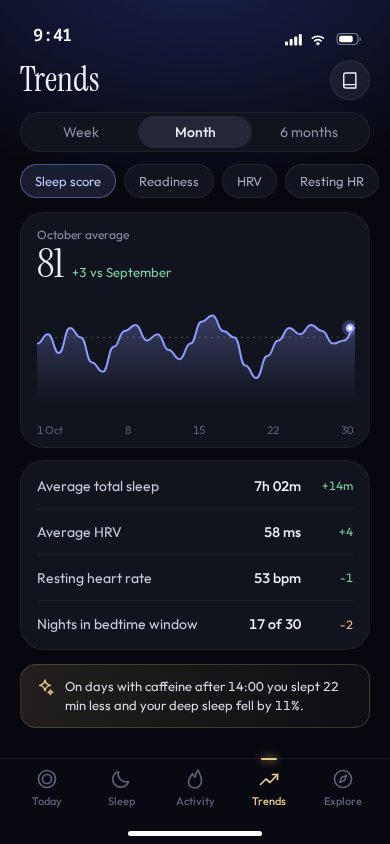
Nightly is a complete smart ring companion: welcome, ring pairing and sign in, a Today home with three halo scores, readiness with its contributors, last night's sleep with a hypnogram and stages, overnight heart rate and HRV, body temperature, an ideal bedtime window, tags, activity, a live workout and its summary, daytime stress, 30 day trends, a journal, guided sessions with a breathing player, circles of friends, notifications, a membership with checkout, the ring itself, profile and settings. Night navy and ink with champagne gold, periwinkle and sage.
| Detail | Value |
|---|---|
| Screen type | Dashboard |
| App | Nightly: Smart ring sleep and readiness |
| Category | Health and fitness |
| Design language | Dark-first, dark |
| Type | Instrument Serif for headings, Outfit for text |
| Colours | #07080f background, #11131d surface, #eef0f7 text, #8a90a6 text-muted, #e9c98b accent, #1c1508 accent-contrast, #8e9cff secondary, #22263a border, #ff7a6b danger |
What this screen says
- Trends
- Week Month 6 months
- Sleep score Readiness HRV Resting HR
- October average
- 81+3 vs September
- 1 Oct 8 15 22 30
- Average total sleep
- 7h 02m+14m
- Average HRV
- 58 ms+4
- Resting heart rate
- 53 bpm-1
- Nights in bedtime window
- 17 of 30-2
- On days with caffeine after 14:00 you slept 22 min less and your deep sleep fell by 11%.
- Today
- Sleep
- Activity
- Explore
Around it in Nightly
More dashboard and stats screens
- Rise Trends: Alarm clock and sleep cycles
- Ward Trend: Patient portal for results, visits and messages
- Level Graph: Glucose monitor companion
- Reformer Progress: Pilates studio booking
- Sip Insights: Water intake and hydration
- Mend Progress: Physio and rehab exercises
- Tabata Stats: HIIT interval timer
- Jab Stats: Boxing workouts with a smart bag
- Exhale Insights: Breathwork sessions
- Bump Trends: Pregnancy week by week
- Locker Busy times: Gym membership and class booking
- Morsel Progress: AI calorie tracker
Every fitness app dashboard screen
What makes a good dashboard screen
- One headline number. The figure that matters most, like balance, steps or revenue, large at the top with its change since the last period.
- Give numbers context. Compared with last week, against a goal or as a trend line. A number alone does not say if it is good.
- Pick simple charts. Bars for comparing periods, lines for trends and rings for progress toward a goal. Avoid charts that need a legend to read.
- Let people change the period. Day, week, month and year as a segmented control above the chart.
The full dashboard screen guide and every example
Remix Nightly free: describe your own app and it is drawn in this design. Or get its files from $10: Figma, React Native, SwiftUI, Flutter and HTML.