Templates · Dashboard and stats screens · Fitness app · Nightly
Nightly Stress screen
A dashboard screen from Nightly, a smart ring sleep and readiness app template in a Dark-first style. Screen 14 of 25.
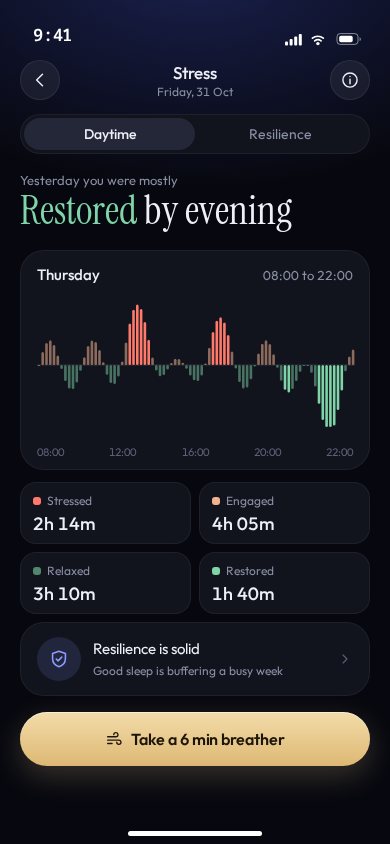
Nightly is a complete smart ring companion: welcome, ring pairing and sign in, a Today home with three halo scores, readiness with its contributors, last night's sleep with a hypnogram and stages, overnight heart rate and HRV, body temperature, an ideal bedtime window, tags, activity, a live workout and its summary, daytime stress, 30 day trends, a journal, guided sessions with a breathing player, circles of friends, notifications, a membership with checkout, the ring itself, profile and settings. Night navy and ink with champagne gold, periwinkle and sage.
| Detail | Value |
|---|---|
| Screen type | Dashboard |
| App | Nightly: Smart ring sleep and readiness |
| Category | Health and fitness |
| Design language | Dark-first, dark |
| Type | Instrument Serif for headings, Outfit for text |
| Colours | #07080f background, #11131d surface, #eef0f7 text, #8a90a6 text-muted, #e9c98b accent, #1c1508 accent-contrast, #8e9cff secondary, #22263a border, #ff7a6b danger |
What this screen says
- StressFriday, 31 Oct
- Daytime Resilience
- Yesterday you were mostly
- Restored by evening
- Thursday08:00 to 22:00
- Stressed
- 2h 14m
- Engaged
- 4h 05m
- Relaxed
- 3h 10m
- Restored
- 1h 40m
- Resilience is solid
- Good sleep is buffering a busy week
- Take a 6 min breather
Around it in Nightly
More dashboard and stats screens
- Medly Vitals: Doctor on call
- Donor Impact: Blood donation, counted drop by drop
- Unfold Streak: Yoga and stretching
- Kilo Stats: Strength training log
- Cyra Insights: Cycle tracker
- Harbor Mood trends: Therapy and mood
- Fasten Weight: Intermittent fasting
- Plate Macros: Calorie and macro tracker
- Vita Overview: Personal health record
- Forge score: AI fitness and nutrition
- Lull Sleep: Sleep sounds and meditation
- Pace Activity: Fitness tracker
Every fitness app dashboard screen
What makes a good dashboard screen
- One headline number. The figure that matters most, like balance, steps or revenue, large at the top with its change since the last period.
- Give numbers context. Compared with last week, against a goal or as a trend line. A number alone does not say if it is good.
- Pick simple charts. Bars for comparing periods, lines for trends and rings for progress toward a goal. Avoid charts that need a legend to read.
- Let people change the period. Day, week, month and year as a segmented control above the chart.
The full dashboard screen guide and every example
Remix Nightly free: describe your own app and it is drawn in this design. Or get its files from $10: Figma, React Native, SwiftUI, Flutter and HTML.