Templates · Detail screens · Productivity app · Merge
Merge Issue screen
A detail screen from Merge, a productivity app template in a Dark-first style. Screen 19 of 25.
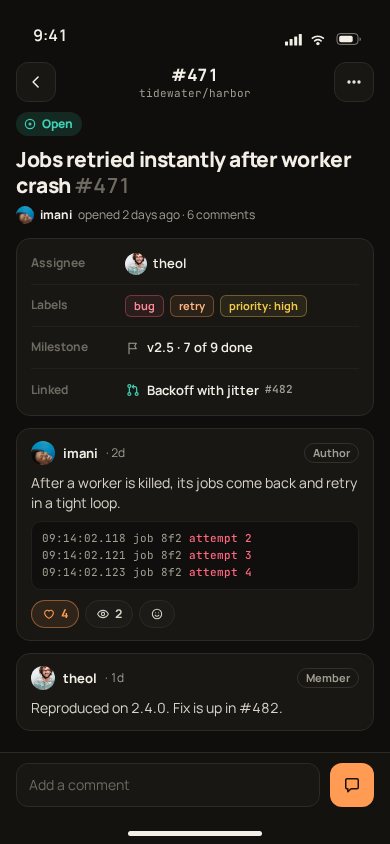
Merge is a complete code review app for your phone: welcome, sign in and two-step verification, a home with your work and reviews waiting, an inbox, search across repositories, pull requests and code, a repository with its files, a code viewer and commits, pull requests with a conversation timeline, a diff with inline comments, submitting a review, live checks with a streaming log, a merge confirmation and the merged state, issues with a detail and a new issue form, repository insights, a release, a Pro plan, profile and settings. Espresso black and charcoal with apricot, teal and rose.
| Detail | Value |
|---|---|
| Screen type | Detail |
| App | Merge: Code, pull requests and reviews |
| Category | Productivity |
| Design language | Dark-first, dark |
| Type | JetBrains Mono for headings, Manrope for text |
| Colours | #0f0e0c background, #181714 surface, #f4efe6 text, #a39d92 text-muted, #ff9b52 accent, #1d1006 accent-contrast, #3fd0b4 secondary, #2c2a25 border, #ff6680 danger |
What this screen says
- #471
- tidewater/harbor
- Open
- Jobs retried instantly after worker crash #471
- imani opened 2 days ago · 6 comments
- Assignee
- theol
- Labels
- bugretrypriority: high
- Milestone
- v2.5 · 7 of 9 done
- Linked
- Backoff with jitter #482
- imani · 2dAuthor
- After a worker is killed, its jobs come back and retry in a tight loop.
- 09:14:02.118 job 8f2 attempt 2
- 09:14:02.121 job 8f2 attempt 3
- 09:14:02.123 job 8f2 attempt 4
- theol · 1dMember
- Reproduced on 2.4.0. Fix is up in #482.
- Add a comment
Around it in Merge
More detail screens
- Outpost Previews: Schedule social posts
- Pageview Channel: Website analytics
- Polish Suggestion: Writing assistant and keyboard
- Tapline Link: Link-in-bio pages and analytics
- Quill Doc: Docs, wikis and databases in one workspace
- Tandem Channel: Team chat, channels and huddles
- Shipyard Issue: Issue tracking for product teams
- Canvas File: Design files and comments on mobile
- Query Answer: AI answers with sources
- Glossa Translation: Translate text, voice and camera
- Layout Template: Design anything from templates
- Tick Task: To-do lists and reminders
Every productivity app detail screen
What makes a good detail screen
- Lead with what identifies the item. A large image or title, the price or status, and the key facts at the top. People should know they are in the right place at a glance.
- Keep the main action visible. A sticky bottom button for Add to cart, Book or Play stays reachable while people scroll through details.
- Order information by importance. The facts that decide the choice come first; reviews, specifications and fine print further down.
- Use progressive disclosure. Long descriptions, specifications and policies can expand on tap rather than filling the screen.
The full detail screen guide and every example
Remix Merge free: describe your own app and it is drawn in this design. Or get its files from $10: Figma, React Native, SwiftUI, Flutter and HTML.