Templates · Detail screens · Music app · Masters
Masters Track screen
A detail screen from Masters, a royalties and streams for artists app template in an Enterprise style. Screen 10 of 25.
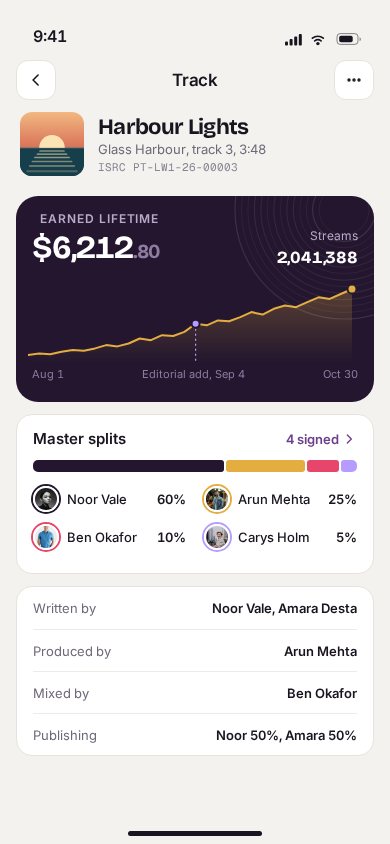
Masters is a complete royalties back office for an independent artist: welcome, sign in and connecting a distributor, a home with the month's earnings and a live launch, earnings and streams dashboards, a dot map of territories, the catalog, a release and a track, split sheets and a collaborator, statements with a gross to net waterfall, a withdraw flow with review and confirmation, a new release form and submission, a live release day tracker, search, notifications, a Pro plan, profile and settings. Warm paper and white with deep aubergine, gold and a coral for live.
| Detail | Value |
|---|---|
| Screen type | Detail |
| App | Masters: Royalties and streams for artists |
| Category | Music |
| Design language | Enterprise, light |
| Type | Bricolage Grotesque for headings, Inter for text |
| Colours | #f4f2ee background, #ffffff surface, #19141f text, #6f6878 text-muted, #23162e accent, #ffffff accent-contrast, #e3ad3f secondary, #e7e3dc border, #d23c4f danger |
What this screen says
- Track
- Harbour Lights
- Glass Harbour, track 3, 3:48
- ISRC PT-LW1-26-00003
- Earned lifetime
- Streams2,041,388
- Aug 1 Editorial add, Sep 4 Oct 30
- Master splits4 signed
- Noor Vale60%
- Arun Mehta25%
- Ben Okafor10%
- Carys Holm5%
- Written by Noor Vale, Amara Desta
- Produced by Arun Mehta
- Mixed by Ben Okafor
- Publishing Noor 50%, Amara 50%
Around it in Masters
More detail screens
- Gigly Gig: Gig and festival tickets
- Padd Edit pad: Beat maker
- Aria Book: Audiobook library
- Hum Match: Song recognition
- Riff Track: Upload and discover new tracks
- Groove Record: Vinyl collection and crate digging
- Crossfade Track: DJ mixing on the go
- Fork Tuning: Tuner and metronome
- Belt Song: Karaoke nights
- Crowd Show: Concert diary and setlists
- Dial Station: Internet radio from everywhere
- Chorus Lesson: Singing lessons and pitch training
What makes a good detail screen
- Lead with what identifies the item. A large image or title, the price or status, and the key facts at the top. People should know they are in the right place at a glance.
- Keep the main action visible. A sticky bottom button for Add to cart, Book or Play stays reachable while people scroll through details.
- Order information by importance. The facts that decide the choice come first; reviews, specifications and fine print further down.
- Use progressive disclosure. Long descriptions, specifications and policies can expand on tap rather than filling the screen.
The full detail screen guide and every example
Remix Masters free: describe your own app and it is drawn in this design. Or get its files from $10: Figma, React Native, SwiftUI, Flutter and HTML.