Templates · Onboarding screens · Travel app · Manifest
Manifest How it works screen
An onboarding screen from Manifest, a travel app template in an Enterprise style. Screen 2 of 25.
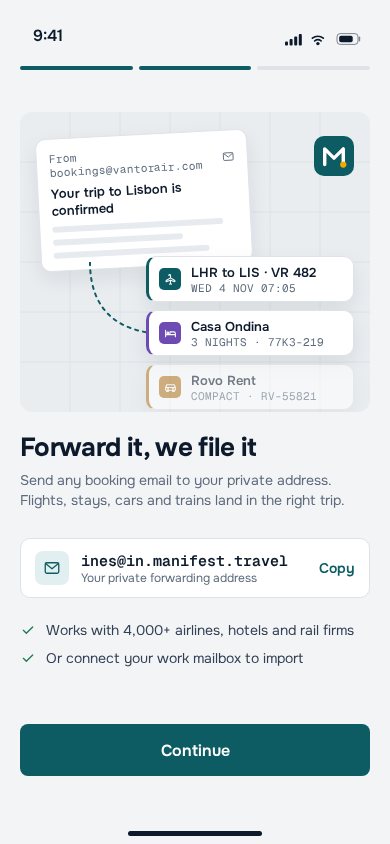
Manifest is a complete trip organiser for people who travel for work: welcome, how forwarding works, sign in, a home with the next flight and live status, trips, a master itinerary timeline, flight details, the inbound aircraft on a live map, a gate change alert, alternate flights with a rebook and confirmation, a boarding pass, hotel and rental car details, a parsed email inbox, a manual plan form, documents, sharing with colleagues, an expense export, travel stats, alerts, a Pro plan, profile and settings. Cool grey and white with deep petrol and signal amber.
| Detail | Value |
|---|---|
| Screen type | Onboarding |
| App | Manifest: Trip plans from your confirmation emails |
| Category | Travel |
| Design language | Enterprise, light |
| Type | Onest |
| Colours | #f3f4f6 background, #ffffff surface, #0c1a2b text, #5d6b7c text-muted, #0d5c63 accent, #ffffff accent-contrast, #f2a900 secondary, #dfe3e8 border, #c23a30 danger |
What this screen says
- From bookings@vantorair.com
- Your trip to Lisbon is confirmed
- LHR to LIS · VR 482
- WED 4 NOV 07:05
- Casa Ondina
- 3 NIGHTS · 77K3-219
- Rovo Rent
- COMPACT · RV-55821
- Forward it, we file it
- Send any booking email to your private address. Flights, stays, cars and trains land in the right trip.
- ines@in.manifest.travel
- Your private forwarding address
- Copy
- Works with 4,000+ airlines, hotels and rail firms
- Or connect your work mailbox to import
- Continue
Around it in Manifest
More onboarding screens
- Navara Welcome: Yacht charter
- Voya Welcome: Travel booking
- Wheelhouse Welcome: Driver app for ride hailing
- Fuelup Welcome: Pay at the pump and car wash
- Omnia Welcome: Super app for rides, food and payments
- Staya Welcome: Homes and stays from local hosts
- Lodge Welcome: Hotels, deals and reservations
- Fare Welcome: Flight search and price alerts
- Rove Welcome: Reviews and things to do
- Ignition Welcome: Car rental from local hosts
- Contrail Welcome: Airline booking, check-in and boarding
- Keycard Welcome: Hotel stays, digital key and room service
Every travel app onboarding screen
What makes a good onboarding screen
- One idea per screen. Each screen should say one thing in a headline people can read in a second. If a screen needs a paragraph, it is doing too much.
- Personalise with a purpose. Ask a question only if the answer changes what people see next, like a goal, a level or an interest. Then show that the answer mattered.
- Explain permissions before asking. Show your own screen saying why you need notifications, location or the camera before the system prompt. People who understand the reason are more likely to allow it.
- Let people skip. A visible skip or "I'll do this later" respects returning users and the impatient. Make sure skipping still lands them somewhere useful.
The full onboarding screen guide and every example
Remix Manifest free: describe your own app and it is drawn in this design. Or get its files from $10: Figma, React Native, SwiftUI, Flutter and HTML.